CCPA delete | Community
Skip to main content
Level 9
November 13, 2020
Solved

CCPA delete

  • November 13, 2020
  • 2 replies
  • 2119 views

Hi Community,

I submitted a CCPA delete request via API and since 20 days it is still showing in processing state.

the profile data deletion is completed but the campaign still shows processing.
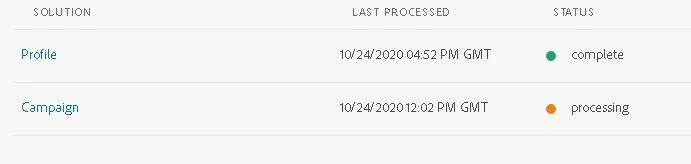


I had submitted two jobs, once had a single email and other had three emails included in the payload, both were delete requests.


why does it take so much time any idea?

also when I looked at the technical workflows, I can see there are workflows for Get privacy requests from pipeline and Privacy delete requests and both are running fine .


The delete workflow has a frequency of daily and 3:40 am CST.

one thing that I noticed is in the delete workflow after the scheduler there is a JS used which only mentions about  loadLibrary("nms:gdpr.js");


I don't see anything about CCPA, is that something that is the reason for my request taking so long and may be stuck?


This post is no longer active and is closed to new replies. Need help? Start a new post to ask your question.
Best answer by mmbb110

By default the the two step process is enabled in Adobe campaign, the fix for this was to take off the '2-step approval' from the Campaign side since using API does not populate the request for approval within the ACS UI.


Restarted workflows and jobs completed fine.

2 replies

Craig_Thonis
Adobe Employee
Adobe Employee
November 13, 2020

Hi mmbb,


The gdpr.js is expected here as the CCPA requirements are basically the California equivalent of the GDPR standards so the same logic applies.


It looks like there is some sort of caching/refresh issue since the requests and such are getting processed.  I'd recommend reaching out to Campaign Support as we'll likely need to review and engage the required internal teams to address this.


Thanks,

Craig

mmbb110Author
Level 9
November 14, 2020
@craig_thonis , Thanks you for your response, I will reach out to Support.
mmbb110AuthorAccepted solution
Level 9
November 26, 2020

By default the the two step process is enabled in Adobe campaign, the fix for this was to take off the '2-step approval' from the Campaign side since using API does not populate the request for approval within the ACS UI.


Restarted workflows and jobs completed fine.