CCMO Exercise 8, Part 1, Step 8 | Community
Skip to main content
Adobe Employee
June 8, 2014
Solved

CCMO Exercise 8, Part 1, Step 8

  • June 8, 2014
  • 4 replies
  • 2343 views

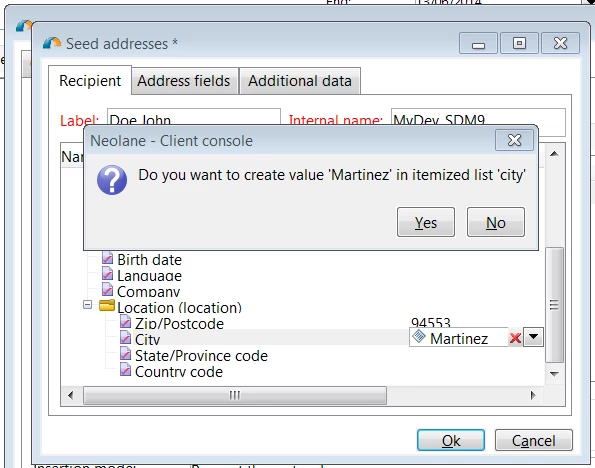
Sorry everyone. I am behind. I got the pop-up box below and I was not sure how to respond. Did anyone else have this?
This post is no longer active and is closed to new replies. Need help? Start a new post to ask your question.
Best answer by Linda_Stinson

To expound upon Todd's answer, some of the combo boxes are populated by a system list that can be open or closed. When the list is open, new values that a user enters can be added to the list. City is one of those. These lists can be seen under Administration > Platform > Itemized Lists. They are different than an enumeration, which are defined as part of the data modelling.

4 replies

June 11, 2014

Not sure if you are still stuck on this one, but assuming 'Martinez' is a lastName and not, in fact, a valid City value, I would select 'No'. 

Linda_Stinson
Adobe Employee
Linda_StinsonAdobe EmployeeAccepted solution
Adobe Employee
June 12, 2014

To expound upon Todd's answer, some of the combo boxes are populated by a system list that can be open or closed. When the list is open, new values that a user enters can be added to the list. City is one of those. These lists can be seen under Administration > Platform > Itemized Lists. They are different than an enumeration, which are defined as part of the data modelling.

June 12, 2014

....and I just discovered that Martinez IS in fact a city in California in the zip code of 94553, so my advice was terrible, lol.  Hey it's not like we can just Google things like this whenever we want...wait, we can?  My last excuse just fell apart!

Linda_Stinson
Adobe Employee
Adobe Employee
June 12, 2014

Well it just so happens that Dave is in CA so he would know!