Can I recover accidentally deleted data base schema? | Community
Skip to main content
poorvab56881543
Level 2
April 26, 2018
Solved

Can I recover accidentally deleted data base schema?

  • April 26, 2018
  • 4 replies
  • 3780 views

I accidentally deleted the data base schema folder and all the schemas are deleted.

Is there a way to recover deleted schemas?

This post is no longer active and is closed to new replies. Need help? Start a new post to ask your question.
Best answer by vraghav

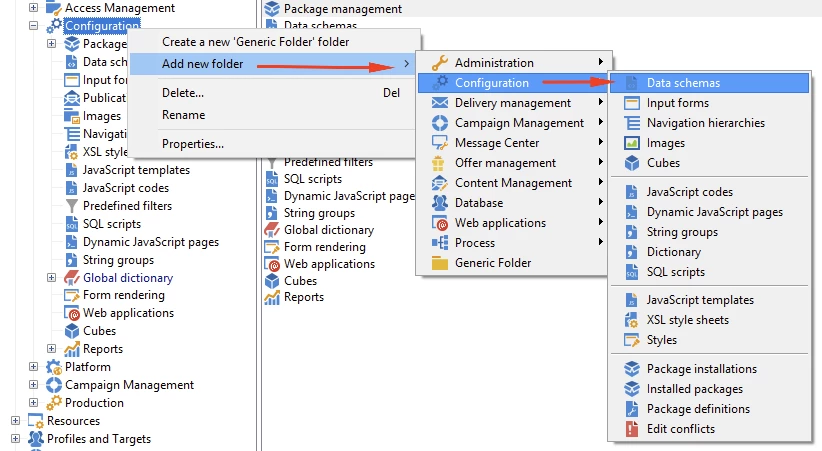
Have you tried recreating the folder by right clicking on Configuration and adding the Data schema folder?

In my opinion, you cannot delete a schema by deleting the folder.

Just add the folder and it should be back. Give it a try and let us know how it goes

4 replies

ShrawanSaxena-1
Adobe Employee
Adobe Employee
April 26, 2018

The only possible way is to restore deleted schema's from the last available backup with the help of  DBA/Infra support team

Level 3
April 26, 2018

This is my understanding also.

A good practice to generate a backup export to certain Adobe objects frequently (e.g., daily backups which gets overwritten after 7 days).

vraghav
Adobe Employee
vraghavAdobe EmployeeAccepted solution
Adobe Employee
April 27, 2018

Have you tried recreating the folder by right clicking on Configuration and adding the Data schema folder?

In my opinion, you cannot delete a schema by deleting the folder.

Just add the folder and it should be back. Give it a try and let us know how it goes

poorvab56881543
Level 2
May 2, 2018

Thanks Vipul! You are right. The schemas do not delete on delete of folder.