Assets url from one environment to another | Community
Skip to main content
Level 4
October 24, 2017
Solved

Assets url from one environment to another

  • October 24, 2017
  • 2 replies
  • 2406 views

HI

I have a question related to the assets path when building templates. I am building templates on Staging environment . I upload the assets on the Library so when I drop them on the template there is a url of that environment. When I push the template to production how I can migrate the urls? also is there a bulk load for the images as well or I have to manually upload them on production as well?

thanks in advance
This post is no longer active and is closed to new replies. Need help? Start a new post to ask your question.
Best answer by ashishgh

Hello

Save the template HTML of staging env as file locally, right now it would be having URL's of staging environment for the images .

Now when you will upload HTML file in production environment template it will automatically reupload assets (images) to use production URL.

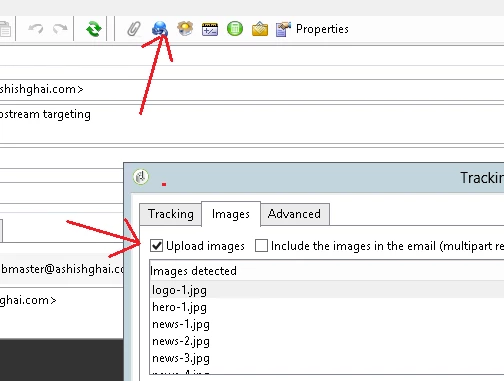
Just make sure that upload images options is checked in tracking  & images settings in your delivery or delivery template.

Thanks,

Ashish Ghai

2 replies

ashishghAccepted solution
October 24, 2017

Hello

Save the template HTML of staging env as file locally, right now it would be having URL's of staging environment for the images .

Now when you will upload HTML file in production environment template it will automatically reupload assets (images) to use production URL.

Just make sure that upload images options is checked in tracking  & images settings in your delivery or delivery template.

Thanks,

Ashish Ghai

Level 4
October 25, 2017

Thanks Ashishgh

Appreciate your quick response. So even though my images are showing with full URL I assume the links will be updated to the production URL once that is pushed there.

thanks