Allow creation of custom segments for Dynamic Reporting | Community
Skip to main content
Level 2
February 22, 2019
Delivered

Allow creation of custom segments for Dynamic Reporting

  • February 22, 2019
  • 8 replies
  • 16142 views

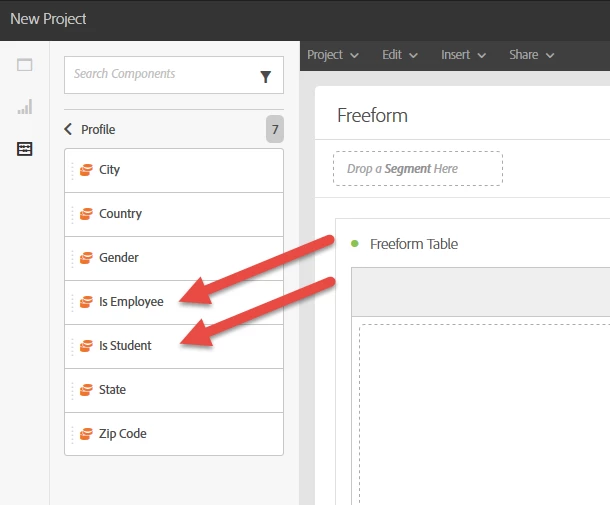
It is possible to create new Dimensions for use in Dynamic Reporting by adding Profile fields to a Sending Logs Extension; these added fields will then appear in the Dimensions area.  Here is an example in which we extended the sending logs with our custom fields "Is Employee" and "Is Student"; these then became available as Dimensions.
However, the only Segments available in Dynamic Reporting are by Age, and there is no way to create more Segments.
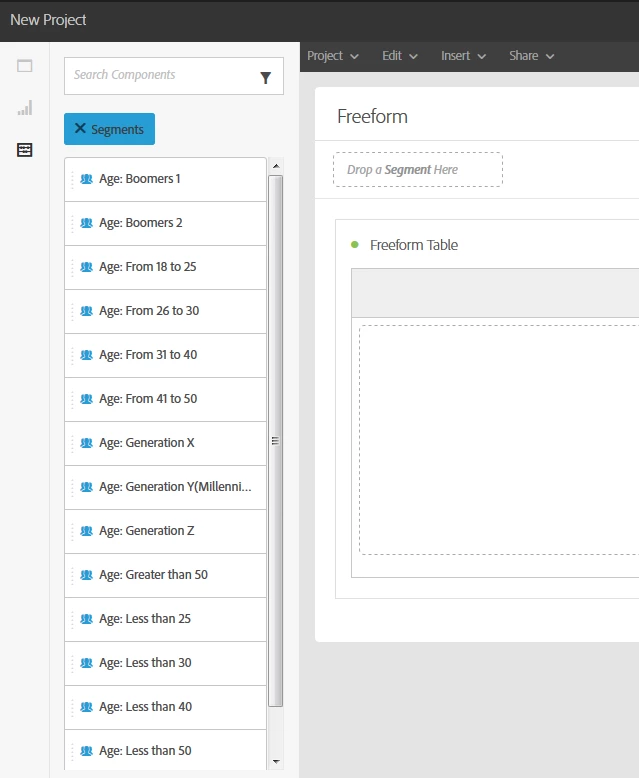
It would be beneficial to allow for the creation of custom segments for use in filtering report results.  For example, we could create segments for various regions across the U.S. by grouping several states into each segment, or by distance from a certain location (i.e. under 50 miles, 50-99 miles, 100-200 miles, etc.), or even by age ranges other than those provided (such as splitting 18-25 into 18-20 and 21-25).

Custom segments should not be specific to a single report.  Like the custom Dimensions, they should be usable in any report.

8 replies

ericperrin
Adobe Employee
Adobe Employee
June 3, 2019

Hello,

This will be available in August release (ACS 19.3). You will be able to share a segment code and retrieve it into Dynamic Reportings. This will be doable via the workflow.

Level 3
September 23, 2019

where is the documentation on this?

ericperrin
Adobe Employee
Adobe Employee
September 24, 2019
Level 3
September 24, 2019

I meant the Segment part and the "doable via workflow" that you mentioned. We are not seeing Segments in our reporting for Campaign at all. Is there something that needs to be turned on?

gaelm59947445
Adobe Employee
Adobe Employee
September 24, 2019

Hello mariecastine​,

Did extend the sending logs with the segment code?

If yes, you should retrieve the segment code dimension into the profile container:

Level 3
September 24, 2019

I checked that box and even added a field but nothing is showing up bc it defaults to "No" to use in dynamic reporting and this area is not editable to change to Yes. 

In eeidbgsu screenshot above, it shows "Segments" with age ranges - but that is not showing up at all for us either.

gaelm59947445
Adobe Employee
Adobe Employee
September 24, 2019
  1. Did you accept the PII consent agreement? If no, we do not collect these type of data.
  2. to edit it, you need to re-draft the custom resources and then re-publish it.
  3. "segments" with ages ranges are not part of profile dimensions. these are OOTB segments part of segments sections.
Sukrity_Wadhwa
Community Manager
Community Manager
February 3, 2021

Available since ACS Release 19.3.

Sukrity Wadhwa