Adobe CRM connector external accounts config error | Community
Skip to main content
krishr65170350
October 4, 2017
Solved

Adobe CRM connector external accounts config error

  • October 4, 2017
  • 4 replies
  • 3344 views

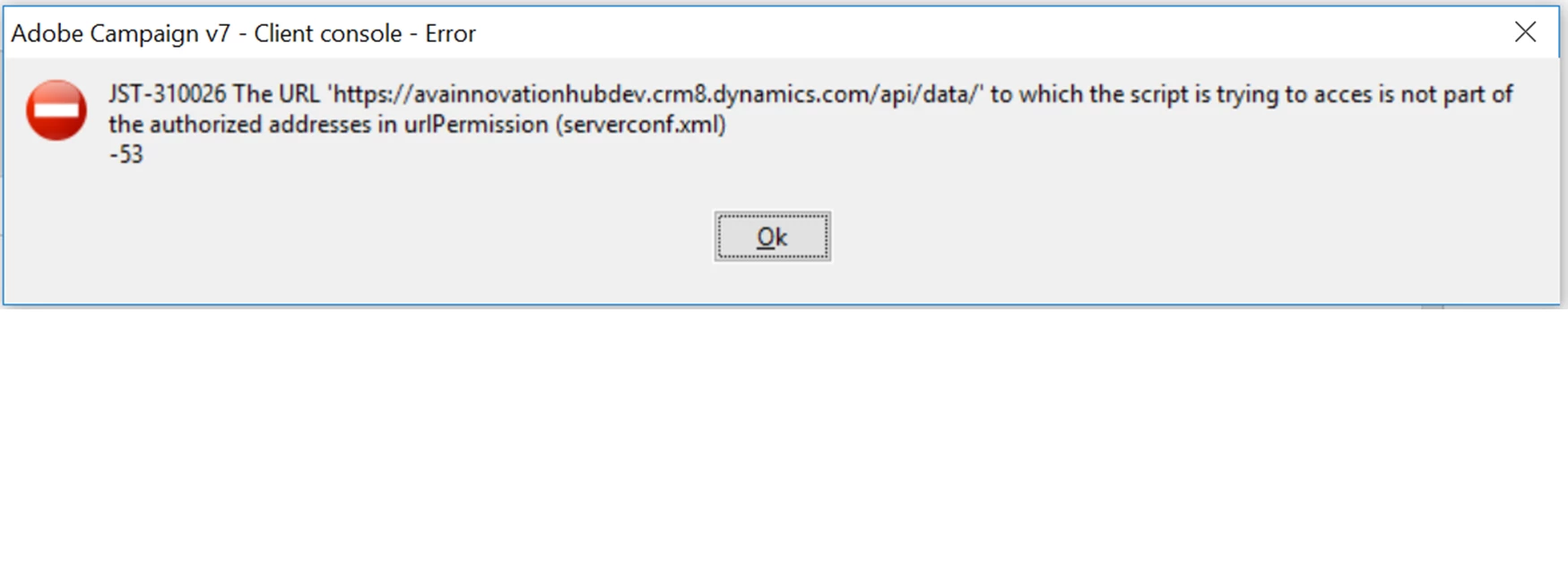
When I tried to configure external accounts for Dynamics 365 CRM. I am facing the below error. I chose Webapi option and provided all the details including Client ID

Anyone faced this issue and pointers will help.

This post is no longer active and is closed to new replies. Need help? Start a new post to ask your question.
Best answer by Jean-Serge_Biro

Hello Krishr,

Since July 2017/build 8857, external URL used by Javascript/workflows etc, must be declared in the serverConf.xml file on the Adobe Campaign server(s), urlPermission section:

See Release Notes below:
https://docs.campaign.adobe.com/doc/AC/en/RN.html

If you don't have access to serverConf.xml file, please ask to your administrator to add your required URL for Microsoft CRM.

Regards.
J-Serge

4 replies

Adobe Employee
October 4, 2017

Moving to Adobe Campaign

Jean-Serge_Biro
Jean-Serge_BiroAccepted solution
Level 10
October 4, 2017

Hello Krishr,

Since July 2017/build 8857, external URL used by Javascript/workflows etc, must be declared in the serverConf.xml file on the Adobe Campaign server(s), urlPermission section:

See Release Notes below:
https://docs.campaign.adobe.com/doc/AC/en/RN.html

If you don't have access to serverConf.xml file, please ask to your administrator to add your required URL for Microsoft CRM.

Regards.
J-Serge

florentlb
Level 10
October 11, 2017

Hi Krish,

Could you have a look at Jean-Serge's suggestion?

Florent

krishr65170350
October 30, 2017

Thank you. It got sorted out. URL was got added to the xml