Adobe Campaign Standard One Profile in Database | Community
Skip to main content
Level 4
May 1, 2018
Solved

Adobe Campaign Standard One Profile in Database

  • May 1, 2018
  • 6 replies
  • 4964 views

There was some setting I configured before where I can have just one email address in the Profiles.  So when I create an email with the same email address, it will just used one record not two records.  Can someone tell me what I can do so clarence@adobe.com and clarence@adobe.com is just one record and doesn't have two integrated profiles with the same email address?

This post is no longer active and is closed to new replies. Need help? Start a new post to ask your question.
Best answer by El_Loco

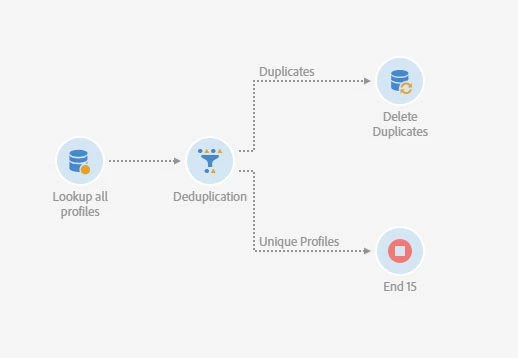
The following should do a simple lookup of all profiles in the database, find the duplicates and then remove the duplicate record based on whatever criteria you specify.

6 replies

arouillard44
Level 4
May 2, 2018

Hello Clarence,

By which way you're creating a new profile ?

By an update workflow ? Using ACS Add Profile Button ?

Regards,

Alexandre

Level 4
May 3, 2018

It was originally upload via a workflow.  But the data is already in the Adobe Campaign Datamart.  What can I do to purge the data to I only have one email address for each integrated profile in the database.

arouillard44
Level 4
May 3, 2018

I advice you to construct a "purge" workflow with a deduplication activity.

That could permit you to keep just one record for each email address.

regards,

Level 4
May 3, 2018

Ok,

1.  Can you show me what that looks like?

2.  What can you do, I remember doing something before, so any new records can only have one email address in the database?

Level 4
August 6, 2018

Can you show me what a  "purge" workflow with a deduplication activity looks like?

El_Loco
El_LocoAccepted solution
Level 5
August 7, 2018

The following should do a simple lookup of all profiles in the database, find the duplicates and then remove the duplicate record based on whatever criteria you specify.