Adobe Campaign Standard Merging Profiles
Hi there
I have trouble finding a solution for merging two existing profiles into one. The structure looks like this pKey is the primary/profile key given by ACS. The externalID is a unique ID given by the external MS Dynamics 365 ID.
| pKey | externalID (unique field) | |
| 1111 | john.doe@gmail.com | |
| 2222 | john.doe@gmail.com | df3e6563-b6cc-ee11-9078-000d3ab2796e |
Expected result
| pKey | externalID (unique field) | |
| 1111 | john.doe@gmail.com | df3e6563-b6cc-ee11-9078-000d3ab2796e |
My current workflow looks like this
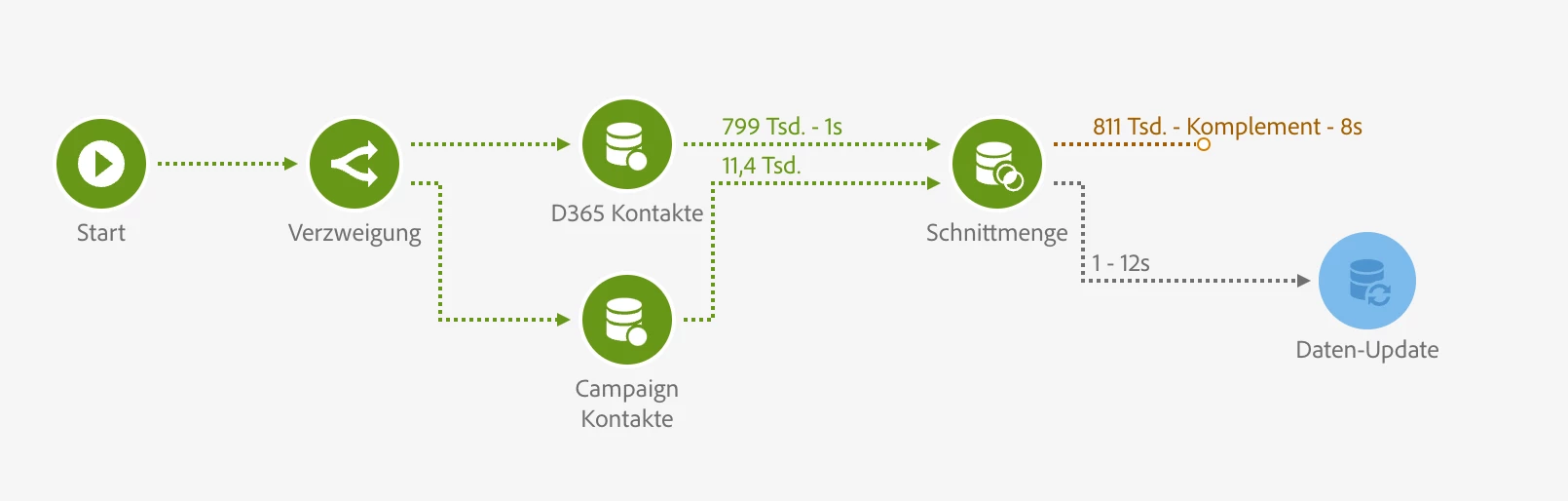
Querry "D365 Kontakte" gives back all contacts with an externalID
Querry "Campaign Kontakte" gives back all contacts who don't have an excternalID
Then I make an intersection based on the email address. Now I know which profile/email I should merge but how can I do that?
Updating the campaign record with the externalID is not possible as it has a uniqueness constrain. Just using the D365 record is also not an option as we would lose the profile history/service subscriptions.
