ACS file transfer with Amazon S3 | Community
Skip to main content
Level 2
April 18, 2018
Solved

ACS file transfer with Amazon S3

  • April 18, 2018
  • 11 replies
  • 9585 views

Hello

I am trying to do a file transfer using S3 protocol,, but i am receiving this error message:

CRL-290151 HTTP response received from S3 400

Which bucket policy should I use? Please advise considering this error log above.

Thank you
This post is no longer active and is closed to new replies. Need help? Start a new post to ask your question.
Best answer by rafikb63477949

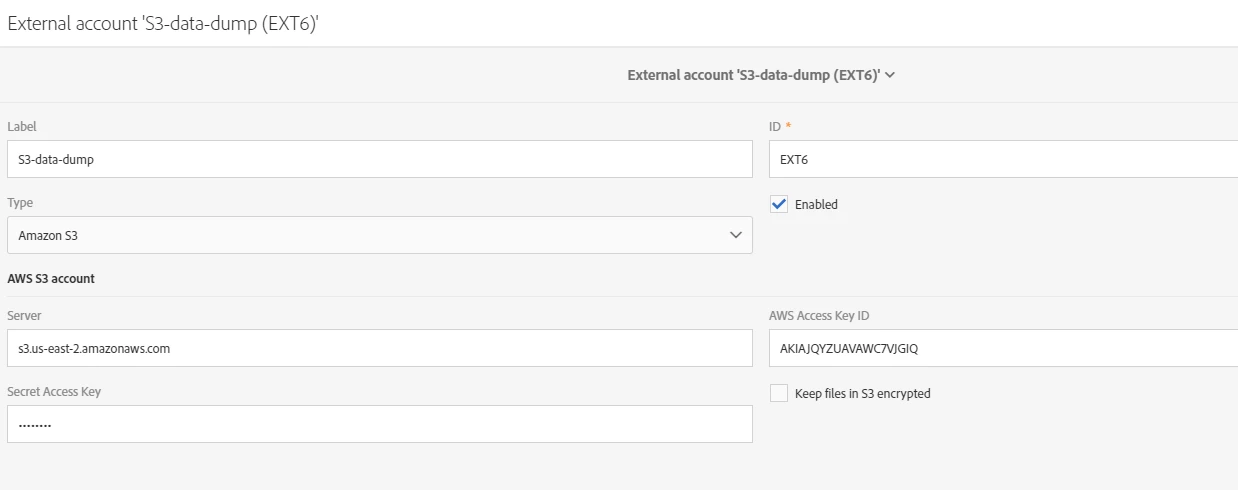
hello Adhiyan

see attached

11 replies

Adhiyan
Adobe Employee
Adobe Employee
April 18, 2018

Hi ,

Can you please share the screenshot of the external account for S3 . Ideally you just need to give the Server address like this :

https://aam-outbound.s3.amazonaws.com/<org_name>

and then providing the Access key and Secret key would do the job

Regards,
Adhiyan

rafikb63477949AuthorAccepted solution
Level 2
April 18, 2018

hello Adhiyan

see attached

florentlb
Level 10
May 9, 2018

Hi,

Were you able to get this to work? Here are the recommendations for S3 external accounts: Adobe Campaign Help | External accounts

Florent

Level 2
May 10, 2018

yes finally

thx

May 23, 2019

Hi

Could you please tell how do you solve this problem?

I have set the external account as your attachment, but still got the error "CRL-290151 HTTP response received from S3 400" in using transfer file.

Adobe Employee
May 23, 2019

Error 400 at S3 mostly referes to using the wrong region when connecting to a bucket.

Can you verify if you set that correctly?

May 23, 2019

Could you share your setting on transfer file?

This is my log messages.

DavidKangni
Community Advisor
Community Advisor
May 27, 2019

Your config should be like

external_accounts_2

David Kangni
chan2111
Level 4
September 16, 2019

This is the same issue I am facing "CRL-290151 HTTP response received from S3 0". Any update on this request.

chan2111
Level 4
September 16, 2019

I have added the right region and it fixed the issue.