[ACS] Can't change copied template setting | Community
Skip to main content
Level 3
August 30, 2017
Solved

[ACS] Can't change copied template setting

  • August 30, 2017
  • 2 replies
  • 1679 views

Hi everyone,

I'm using Adobe Campaign Sandbox and trying to duplicate template.

However, I can't change the copied template label name and brand...etc..

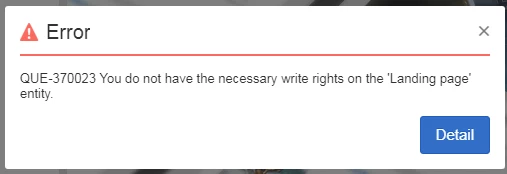
When I clicked save, the following alert was shown. But I'm already the administrator of ACS.

How could I check this problem?  Is that means we didn't have the function license in the sandbox?  Thanks.
This post is no longer active and is closed to new replies. Need help? Start a new post to ask your question.
Best answer by vraghav

Hi Han,

It could be related to the rights provided to you as this is a training environment and might be used by other teams. So the instance hosting team doesn't want you to change something accidentally.

You can reach out to spphelp@adobe.com with your query and they will look into the issue.

Regards,
Vipul

2 replies

vraghav
Adobe Employee
vraghavAdobe EmployeeAccepted solution
Adobe Employee
August 30, 2017

Hi Han,

It could be related to the rights provided to you as this is a training environment and might be used by other teams. So the instance hosting team doesn't want you to change something accidentally.

You can reach out to spphelp@adobe.com with your query and they will look into the issue.

Regards,
Vipul

han_tingAuthor
Level 3
August 30, 2017

Hi Vipul,

Ok, I see.

Thanks for your help.

Regards,

Han
