
Wrong use of barcode in my email
Hello everyone,
I have an issue with the rendering of a barcode in my email.
This is what I use for my barcode right now in my HTML template :
<tr>
<td style="padding: 5px 0 15px;" align="center">
<img src="https://campaign.kruidvat.be/barcode/tISBN/h70/s2/v<%= targetData.cardNumber %>/barcode.gif" width="179" height="70" style="min-width: 179px; display: block; color: #6c1a2c; font-family: Helvetica, arial, sans-serif; font-size: 13px; width: 179px; " alt="barcode" border="0">
</td>
</tr>
And this is the rendering in my email :
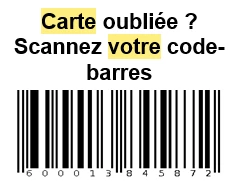
The numbers of the cardNumber are displaying correctly but the first number doesn't want to appear. Normally, the cardNumber contains 13 numbers and in the barcode, only 12 numbers are displaying well. For certain purpose, we only want to use this type of barcode (tISBN)
Is there something wrong in this part of the HTML ?
Feel free to tell me if you need more information.
Thank you for your help.
Kind regards.