This post is no longer active and is closed to new replies. Need help? Start a new post to ask your question.
ParthaSarathy
ParthaSarathyAccepted solution
Community Advisor
May 15, 2025 4:41 PM UTC

HI @menno_aartsen ,

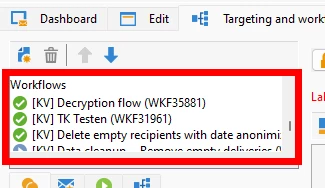
By default it is arranged based on campaign workflow's creation date (Sort order - Older to Newest)

The first created workflow will be in top, and then followed by next created workflows. You can rearrange the workflow order.

~  ParthaSarathy S

3 replies

ParthaSarathy
Community Advisor
ParthaSarathyCommunity AdvisorAccepted solution
Community Advisor
May 15, 2025 4:41 PM UTC

HI @menno_aartsen ,

By default it is arranged based on campaign workflow's creation date (Sort order - Older to Newest)

The first created workflow will be in top, and then followed by next created workflows. You can rearrange the workflow order.

Translate
~  ParthaSarathy S
New Member
May 15, 2025 9:15 PM UTC

And as soon as you rearrange the workflows, Adobe must have saved this order somewhere. Because next time I open Adobe Campaign it shows me the new order. So Adobe mjust save this new order somewhere. But where can I find this? 

Translate
ParthaSarathy
Community Advisor
Community Advisor
May 16, 2025 4:58 AM UTC

It is stored as XML. You can right click somewhere on the campaign  > Edit XML source > You can find the workflow element arranged in the same order.

<operation _cs="Campaign Label (OP111)" *********> <*********/> <*********/> <*********/> <workflow _cs="New workflow1 (WKF111)" *********> <*********/> <*********/> </workflow> <workflow _cs="New workflow2 (WKF222)" *********> <*********/> <*********/> </workflow> </operation>
Translate
~  ParthaSarathy S