what is different between File transfer and file collector ? | Community
Skip to main content
Level 2
September 22, 2023
Solved

what is different between File transfer and file collector ?

  • September 22, 2023
  • 1 reply
  • 2536 views

Hi Team,

I am new to learning Adobe Campaign Classic. Please explain the difference Between file collector and File transfer. And Split and cells? javascript code activity and Advanced Java script code activity? please share examples it's more helpful to me.


B/W

1) File Transfer / File Collector?

2) Split / Cells?

3) Javascript code activity /  Advanced Javascript Activity? 

This post is no longer active and is closed to new replies. Need help? Start a new post to ask your question.
Best answer by ParthaSarathy

Hi @kumar_27 ,

File Collector:
The File collector monitors the arrival of one or more files in a directory and activates its transition for each file received.
The files must be on the server on which the wfserver module in charge of this workflow is executed. It can only collect the file from server and It can't be used to download files from external SFTP.
File Collector document


File transfer:
The File transfer activity lets you receive or send files, test for file presence, or list files on a server.
You can create an external account for an external SFTP, and download/Upload the file to external SFTP using File transfer activity.
File transfer document


Split and Cells:

A Split-type activity lets you split a target into several subsets. You can split based on a filtering condition with targeting data or you can also limit the record counts.
Split document


The Cells activity provides a view of the various subsets in the form of data columns.
Cell document
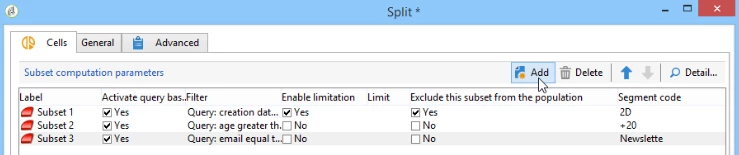
 

Split and Cells Activity are almost same except the UI, there isn't any explicit difference between the two. Both allow Sub Sets to be created based on different query conditions for any available Schema within the Database. Both also allow to limit the data (Random or Percentage Range etc).


But in Cells, by modifying the Workflow input form, you can add 'Data' tab to the cell activity, which will allow you to enable the association of an offer and a priority level for each subset. For the configuration of this you can refer here.


JavaScript activity:
The central area of the editor contains the script to be executed. If you want to perform any scripting on you workflow, you can utilize JavaScript activity
JavaScript activity document


Advanced JavaScript activity:
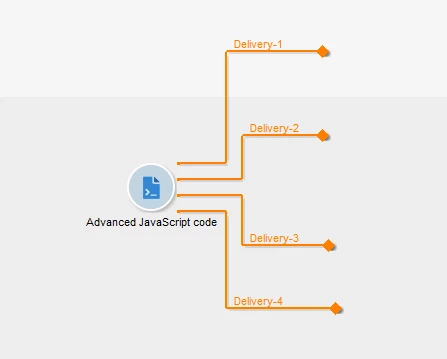
This is same as JavaScript activity, here you can schedule when the script to be executed. And based on your script conditions, if you want to create multiple transitions, you can use this activity.
Advanced JavaScript activity document
1 reply

ParthaSarathy
Community Advisor
ParthaSarathyCommunity AdvisorAccepted solution
Community Advisor
September 23, 2023

Hi @kumar_27 ,

File Collector:
The File collector monitors the arrival of one or more files in a directory and activates its transition for each file received.
The files must be on the server on which the wfserver module in charge of this workflow is executed. It can only collect the file from server and It can't be used to download files from external SFTP.
File Collector document


File transfer:
The File transfer activity lets you receive or send files, test for file presence, or list files on a server.
You can create an external account for an external SFTP, and download/Upload the file to external SFTP using File transfer activity.
File transfer document


Split and Cells:

A Split-type activity lets you split a target into several subsets. You can split based on a filtering condition with targeting data or you can also limit the record counts.
Split document


The Cells activity provides a view of the various subsets in the form of data columns.
Cell document


Split and Cells Activity are almost same except the UI, there isn't any explicit difference between the two. Both allow Sub Sets to be created based on different query conditions for any available Schema within the Database. Both also allow to limit the data (Random or Percentage Range etc).


But in Cells, by modifying the Workflow input form, you can add 'Data' tab to the cell activity, which will allow you to enable the association of an offer and a priority level for each subset. For the configuration of this you can refer here.


JavaScript activity:
The central area of the editor contains the script to be executed. If you want to perform any scripting on you workflow, you can utilize JavaScript activity
JavaScript activity document


Advanced JavaScript activity:
This is same as JavaScript activity, here you can schedule when the script to be executed. And based on your script conditions, if you want to create multiple transitions, you can use this activity.
Advanced JavaScript activity document

~  ParthaSarathy S~  Click here to join ADOBE CAMPAIGN USER GROUP for Quarterly In-person | Hybrid | Virtual Meetups

Kumar_27Author
Level 2
January 19, 2024

Hi @parthasarathy ,


Thanks for clarifying Could you please explain the use of 

" task.setCompleted();" in advanced JS activity? Also, what is the use of  First Call and Next Call?