Level 2
May 10, 2019
Solved

What does this error mean: "JST-#ID# Error while compiling script 'content htmlContent' line 157: targetData is not defined. SCR-#ID# JavaScript: error while evaluating script 'content htmlContent'."

  • May 10, 2019
  • 3 replies
  • 7286 views

Hi,

I am unable to send proofs when using a personalization block. It works fine when sending the delivery.
My delivery fails with the error message: "JST-#ID# Error while compiling script 'content htmlContent' line 157: targetData is not defined. SCR-#ID# JavaScript: error while evaluating script 'content htmlContent'."

Please help!

Thanks,

Vishal

This post is no longer active and is closed to new replies. Need help? Start a new post to ask your question.
Best answer by Venu_Reddy

Hello Vishal,

Recurring Delivery in Adobe campaign is unique as compared to standard delivery. If you are using Recurring delivery Adobe campaign doesn't create a delivery instance until you execute the workflow/delivery. If you want to use the send proof, follow given steps.

1. Enable content approval in delivery; this is used to validate that you are using the correct content.

2. start/execute the workflow/this will generate an instance of delivery under delivery execution folder.

3. Go to delivery execution folder; you will be able to see your delivery, open that delivery from there.

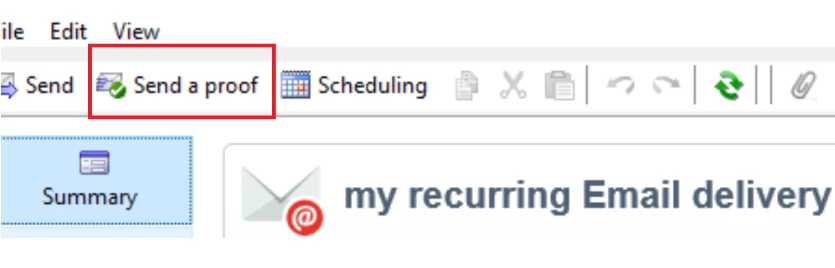
4. Now you can see a button, send proof use that to send a proof, once satisfied approve the content.

Regards,

Venu

3 replies

Venu_Reddy
Level 6
May 10, 2019

Hello Vishal,

Please check the below similar thread and hope it helps

targetdata is not defined

Regards,

Venu

Level 2
May 10, 2019

Hi,

Just realized that this happens when I am using a reoccurring delivery. For a one time delivery, the substitution of address works fine.

Why is that, can someone help?

Venu_Reddy
Venu_ReddyAccepted solution
Level 6
May 10, 2019

Hello Vishal,

Recurring Delivery in Adobe campaign is unique as compared to standard delivery. If you are using Recurring delivery Adobe campaign doesn't create a delivery instance until you execute the workflow/delivery. If you want to use the send proof, follow given steps.

1. Enable content approval in delivery; this is used to validate that you are using the correct content.

2. start/execute the workflow/this will generate an instance of delivery under delivery execution folder.

3. Go to delivery execution folder; you will be able to see your delivery, open that delivery from there.

4. Now you can see a button, send proof use that to send a proof, once satisfied approve the content.

Regards,

Venu