webapp survey | Community
Skip to main content
November 5, 2020
Solved

webapp survey

  • November 5, 2020
  • 2 replies
  • 1437 views

Hello All,

I am wondering if someone of you knows how to limit the responses on a survey web app.

I want to create one that can store up to 100 responses no more, and then to redirect to the end activity.

Do have any idea how I can do that with a javascript or from any other activity?


Thanks a lot in advance.

This post is no longer active and is closed to new replies. Need help? Start a new post to ask your question.
Best answer by Shivam_Singh

There can be a custom solution to this. You can use a counter in JS to store the number of responses that have been received (After the survey page and before the end activity as depicted by Script 2 in the diagram below). You can store this count in a global variable (option) by using the setOption() method.
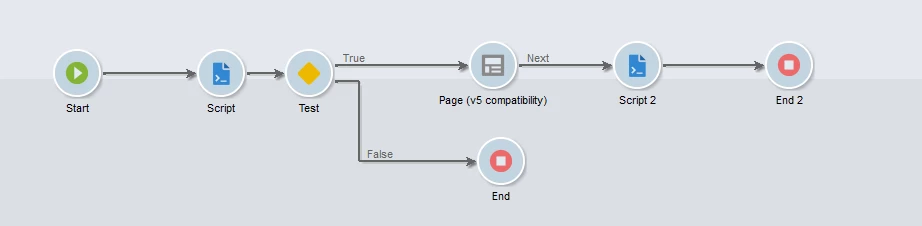


Now every time the survey is opened, you can add a JS validator (Script 1 in the above diagram ) that checks the current survey count from the option that you set earlier (using getOption() method). If it's less than 100, you can update a boolean variable and then use a test activity to validate the boolean and trigger the survey page or the End activity as per its value.

2 replies

Shivam_Singh
Adobe Employee
Shivam_SinghAdobe EmployeeAccepted solution
Adobe Employee
November 11, 2020

There can be a custom solution to this. You can use a counter in JS to store the number of responses that have been received (After the survey page and before the end activity as depicted by Script 2 in the diagram below). You can store this count in a global variable (option) by using the setOption() method.


Now every time the survey is opened, you can add a JS validator (Script 1 in the above diagram ) that checks the current survey count from the option that you set earlier (using getOption() method). If it's less than 100, you can update a boolean variable and then use a test activity to validate the boolean and trigger the survey page or the End activity as per its value.

Sukrity_Wadhwa
Community Manager
Community Manager
November 17, 2020

Hi @dimitriosc21803,

Was the given solution helpful to resolve your query? Do let us know.

Thanks!

Sukrity Wadhwa