web server cannot be started Unrecognized option: --add-opens=java.base/java.io=ALL-UNNAMED | Community
Skip to main content
Marcel_Szimonisz
Community Advisor
Community Advisor
September 16, 2024
Solved

web server cannot be started Unrecognized option: --add-opens=java.base/java.io=ALL-UNNAMED

  • September 16, 2024
  • 1 reply
  • 4082 views

Hello Dear Campaigners,

We have patched our server to 7.4.1 [8f8ba2f](9383) after we are not able to start web server we get following error
Unrecognized option: --add-opens=java.base/java.io=ALL-UNNAMED

Java version:
java version "18" 2022-03-22
Java(TM) SE Runtime Environment (build 18+36-2087)
Java HotSpot(TM) 64-Bit Server VM (build 18+36-2087, mixed mode, sharing)

OS: Windows server 2022 
DB: MSSQL 2022

I did not find anything on the internet 🙂

I did reinstall adobe, java nothing helped


Marcel 



This post is no longer active and is closed to new replies. Need help? Start a new post to ask your question.
Best answer by DavidKangni

@marcel_szimonisz 
make sure you have the correct path for JRE


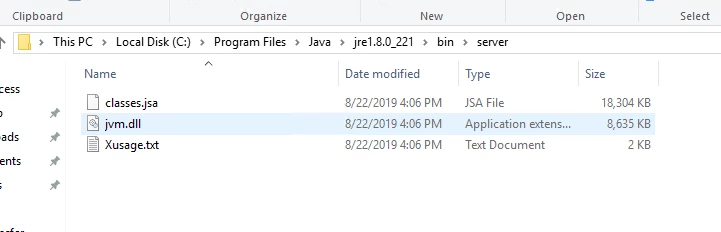
older version of java was creating 2 folders for JDK and JRE


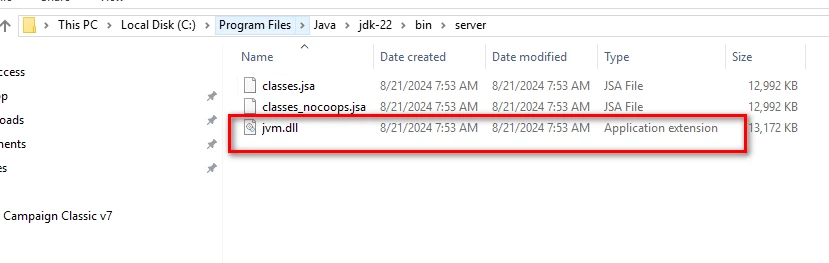
newer version of java 

Not sure if it's related but last time I was installing the latest release I had a java issue and I was able to fix it by checking the JRE path


https://experienceleague.adobe.com/en/docs/experience-cloud-kcs/kbarticles/ka-17288


Thanks,

David

1 reply

DavidKangni
Community Advisor
Community Advisor
September 16, 2024

Hi @marcel_szimonisz 


Can you please check the java requirements as starting v7.4.1 you must generate a JRE as it is no longer provided by default.


https://experienceleague.adobe.com/en/docs/campaign-classic/using/installing-campaign-classic/install-campaign-on-prem/deployment-guidelines/application-server#jdk


Thanks,
David

David Kangni
Marcel_Szimonisz
Community Advisor
Community Advisor
September 16, 2024

Hello @davidkangni, what does it mean generate JRE? I have defined JRE_HOME env. We have installed JDK and JRE.

Marcel

DavidKangni
Community Advisor
DavidKangniCommunity AdvisorAccepted solution
Community Advisor
September 16, 2024

@marcel_szimonisz 
make sure you have the correct path for JRE


older version of java was creating 2 folders for JDK and JRE


newer version of java 

Not sure if it's related but last time I was installing the latest release I had a java issue and I was able to fix it by checking the JRE path


https://experienceleague.adobe.com/en/docs/experience-cloud-kcs/kbarticles/ka-17288


Thanks,

David

David Kangni