Web Application errors | Community
Skip to main content
lucase44657502
June 25, 2018

Web Application errors

  • June 25, 2018
  • 2 replies
  • 6508 views

Hi,

I am getting two types of errors on all web applications (even the default webapps) using admin access, however the root cause might be the same. Any help would be greatly appreciated.

1) Error previewing/accessing web app

This is the error Adobe Support can see from the web logs:' Previews are not authorized via the XXX address. (iRc=-56)'

The error still persists though even after Adobe whitelisted the XX.. IP address.

Another alternative we tried to no avail was for 'Access Control' I also tried using a 'specific user account' as opposed to 'anonymous access'.

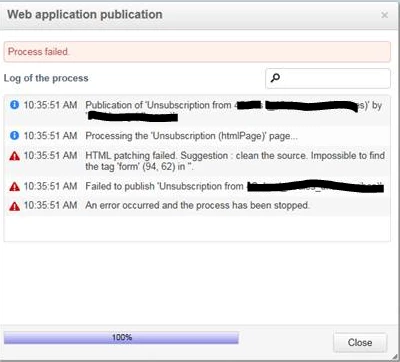
2) Error publishing web app:
Thank you

This post is no longer active and is closed to new replies. Need help? Start a new post to ask your question.

2 replies

pablo_rosero1
Level 9
November 28, 2018

Hi Lucas,

This could be just because of access issues. Please see Access management​.

I hope this helps!

All the best,

Pablo Rosero

Level 2
November 1, 2019

Hi Lucase,

We are experiencing the same issue, I see in the log files this line below. It isnt an access management issue, Its the IP trying to host the web preview. Hopefully this helps someone in the future, but it seems you have to add that IP to the securityZone section in the config file

log line --> XSV-350147 Previews are not authorized via the 198.208.3.250 address. (iRc=-56)

Craig_Thonis
Adobe Employee
Adobe Employee
November 7, 2019

Connor is correct, you need to ensure that the IPs are whitelisted.  Please see the documentation below on the security zones:

Configuring Campaign server