
bryceh57660644
Level 2
Jun 2, 2020 4:57 PM UTC
Solved

Web App input type=tel

Hey,


I am currently trying to set up a landing page where one of the inputs is a telephone number.


<input name="phonenumber" title="Confirm your Phone Number:" class="textInput defaultText" id="control_PHONENUMBER" style="border-radius: 6px; margin: 0 3px 5px 0px;" oninput="updatePhoneNumber(this.value)" type="tel" placeholder="555-555-5555" pattern="[0-9]{3}-[0-9]{3}-[0-9]{4}" label="phonenumber" />


I have saved this code a few times, and when I reopen, the type is changed to text. Any suggestions on how to get it to get for a phone number?

This post is no longer active and is closed to new replies. Need help? Start a new post to ask your question.
Manoj_Kumar
Manoj_KumarAccepted solution
Community Advisor
Jun 3, 2020 6:10 AM UTC

Hello @bryceh57660644 ,

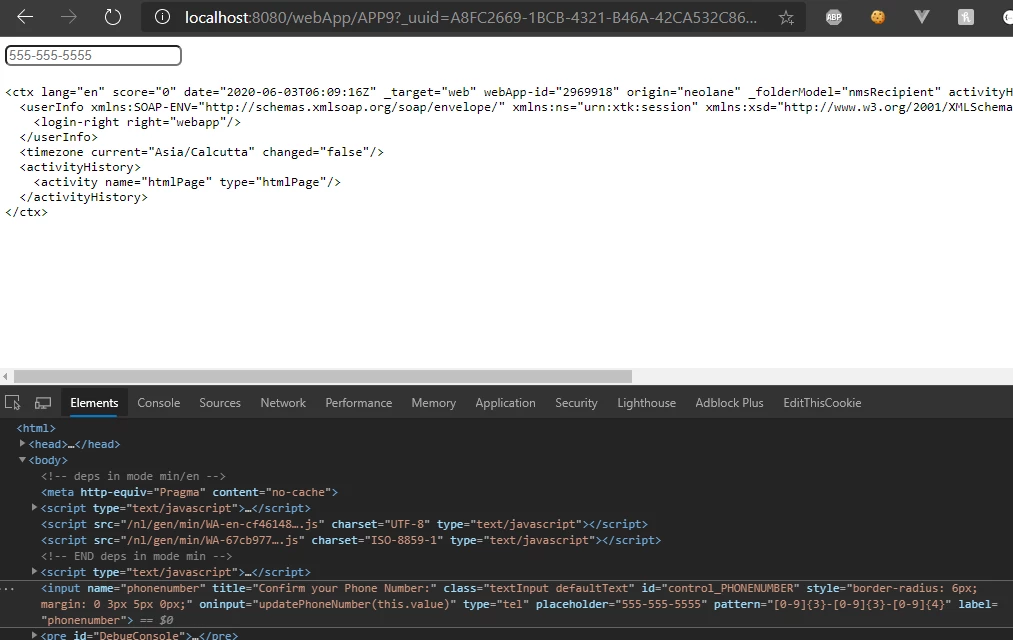
After Making changes to your input form from the source tab of page activity. DONT navigate to editor tab. This will convert the type='tel' to type='text'. 

So whenever you are opening the activity. Navigate immediately to source tab. DONT let the editor tab load.

This will fix the issue. Sharing the screen of how it is appearing for me by following this approach


Let me know if that helps


Manoj  | https://themartech.pro

1 reply

Manoj_Kumar
Community Advisor
Manoj_KumarCommunity AdvisorAccepted solution
Community Advisor
Jun 3, 2020 6:10 AM UTC

Hello @bryceh57660644 ,

After Making changes to your input form from the source tab of page activity. DONT navigate to editor tab. This will convert the type='tel' to type='text'. 

So whenever you are opening the activity. Navigate immediately to source tab. DONT let the editor tab load.

This will fix the issue. Sharing the screen of how it is appearing for me by following this approach


Let me know if that helps


Translate
Manoj  | https://themartech.pro