we are not able to acess List data in adobe campaign | Community
Skip to main content
Level 4
September 1, 2023
Solved

we are not able to acess List data in adobe campaign

  • September 1, 2023
  • 3 replies
  • 816 views

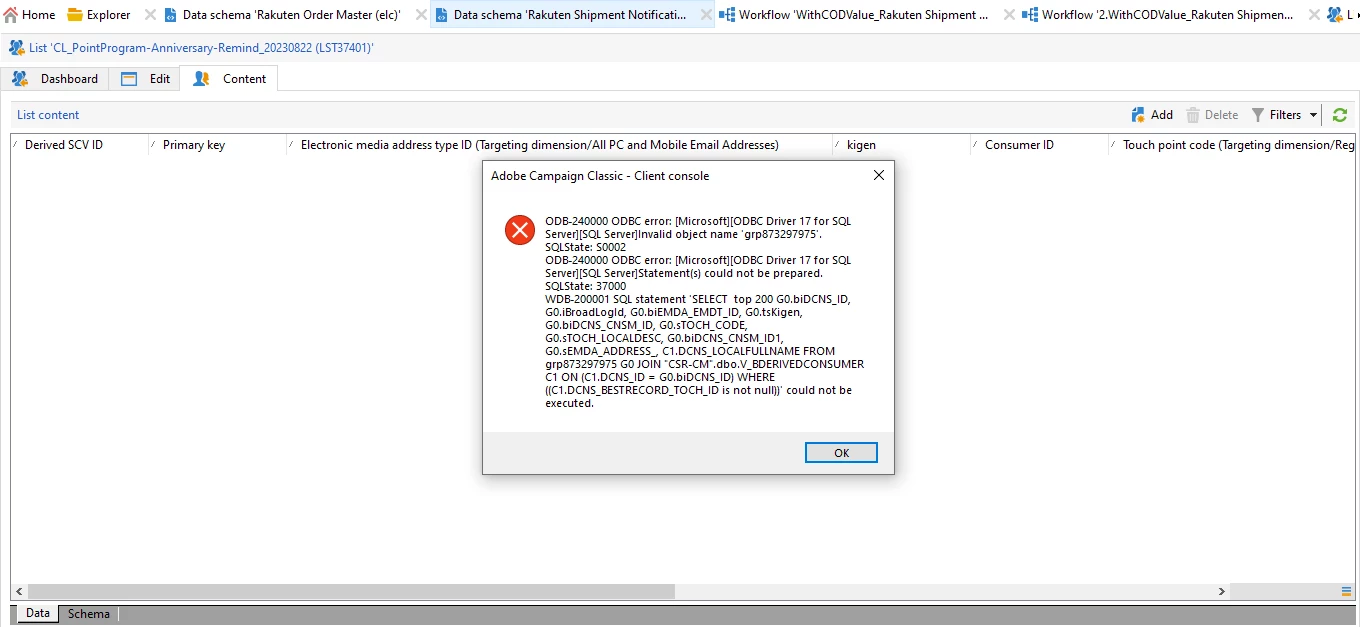
We are not able to access List data in adobe campaign, we can see the list name....IN ADOBE campaign


upon checking in database we cant find this 'grp table' : any idea why this list data is not access these tables 

is there any workflow which is deleting the tables?///         
 

This post is no longer active and is closed to new replies. Need help? Start a new post to ask your question.
Best answer by LakshmiPravallika

Hi @shrutii ,


Have you tried re running the Workflow where the list is getting created?


Also, Please check the Data in the Workflow by enabling the Interim results in Workflow properties.


After the workflow completes, go to Profiles and Targets --> Lists and check whether the List got created and you can able to see the Content in it.


After completing this, Please check the group List Table (nms:rcpGrpRel) you are referring to for the Data.


Regards,

Pravallika.


3 replies

jorgeferreira
Level 3
September 5, 2023

Can you see the list content immediately after running the workflow?


Otherwise, I would suggest to disable the write to list activity and display the target:

Check if all the information you need is there.
On this simple workflow, I'm writing the List as follows:


Even after the cleaning workflow run, deleting the workflow that created this list, the data stayed there. 


LakshmiPravallika
Community Advisor
LakshmiPravallikaCommunity AdvisorAccepted solution
Community Advisor
September 5, 2023

Hi @shrutii ,


Have you tried re running the Workflow where the list is getting created?


Also, Please check the Data in the Workflow by enabling the Interim results in Workflow properties.


After the workflow completes, go to Profiles and Targets --> Lists and check whether the List got created and you can able to see the Content in it.


After completing this, Please check the group List Table (nms:rcpGrpRel) you are referring to for the Data.


Regards,

Pravallika.


Sukrity_Wadhwa
Community Manager
Community Manager
September 27, 2023

Hi @shrutii,

Were you able to resolve this query with the help of the given solutions or do you still need more help here? Do let us know. In case the given solutions were helpful, then kindly choose the one that helped you the most as the 'Correct Reply'.
Thanks!

Sukrity Wadhwa