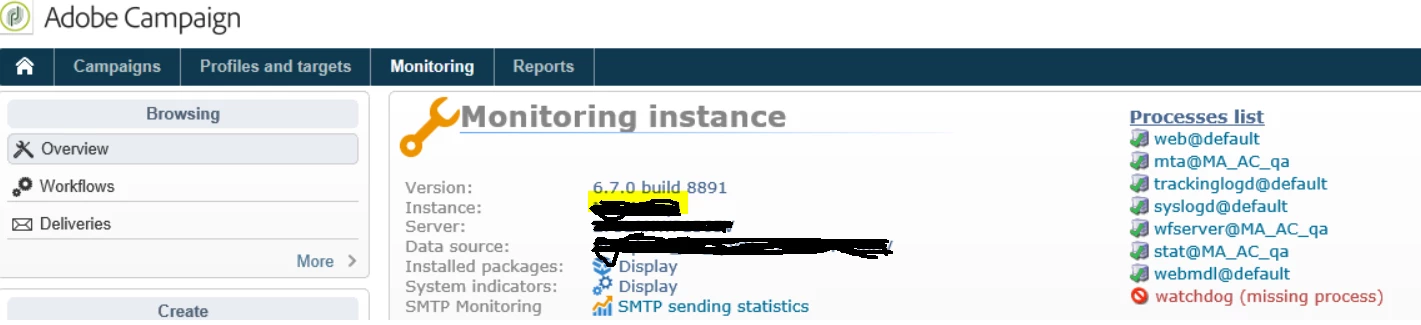
Watchdog -Missing process | Adobe Higher Education
Skip to main content
Questo argomento è stato chiuso alle risposte.
Migliore risposta di InMo

Hi @ramprakasht3196 ,


If It is installed on Adobe end, you need to raise a support ticket for this.

If it is on premise, please login to your server where Campaign is installed and run below command

nlserver  pdump


Check what all different modules are running. You can check different log files to check the reason why watchDog is not running. But for quick fix, you can restart watchDog module.


Check below link for reference

https://docs.adobe.com/content/help/en/campaign-classic/using/monitoring-campaign-classic/production-procedures/usual-commands.html


Regards

2 risposte

InMoRisposta
Level 3
June 17, 2020

Hi @ramprakasht3196 ,


If It is installed on Adobe end, you need to raise a support ticket for this.

If it is on premise, please login to your server where Campaign is installed and run below command

nlserver  pdump


Check what all different modules are running. You can check different log files to check the reason why watchDog is not running. But for quick fix, you can restart watchDog module.


Check below link for reference

https://docs.adobe.com/content/help/en/campaign-classic/using/monitoring-campaign-classic/production-procedures/usual-commands.html


Regards

Jonathon_wodnicki
Community Advisor
Community Advisor
June 17, 2020

Hi,


Restart the nlserver6 service.

On Linux: systemctl restart nlserver6

Windows: Start -> Run -> services.msc -> Find nlserver6 in list and restart


Thanks,

-Jon