use web app click to update a column | Community
Skip to main content
jitendrakhatwani
Level 2
April 11, 2020
Solved

use web app click to update a column

  • April 11, 2020
  • 1 reply
  • 2113 views

Hi All,

I have a simple query here.
I have a webapp created and the link of the webapp is sent in the email.
My query is: whenever a user clicks on that web app link, it will redirect to a thank you page also at the same time I have a column in my recipient table with the name: hasClicked, this should become true
Any thought on how to achieve that only using adobe campaign classic
Any help is highly appreciated.

Regards
Jay

This post is no longer active and is closed to new replies. Need help? Start a new post to ask your question.
Best answer by Manoj_Kumar

Hello @jitendrakhatwani 


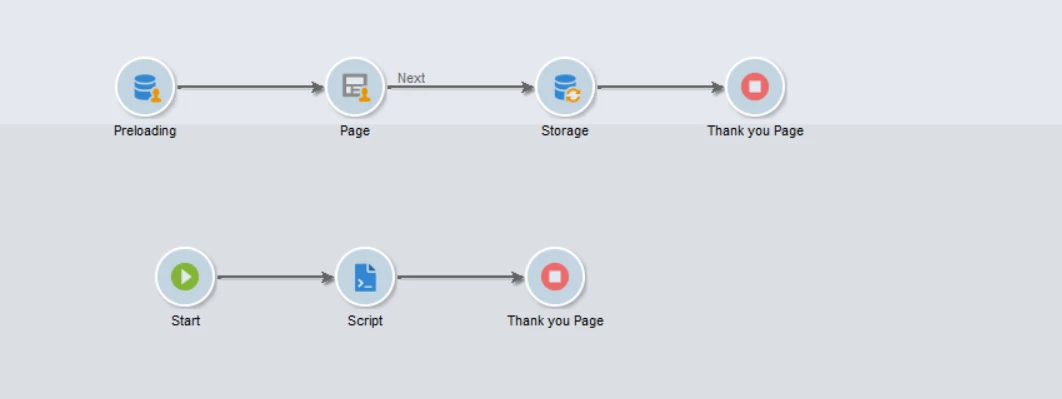
There are 2 ways to do it in WebApp as shown in the image below:


1) Pass the encrypted id in the webapp URL which is available in the email. Then use preloading to get the recipient and map the has clicked field in the Page and make the form auto submit then use storage to update the hasclicked field and the show the thank you page.
2) Use the javascript to get the URL parameter and load the recipient with JS and use xtk session write to update the field.

Thanks,

Manoj

1 reply

Manoj_Kumar
Community Advisor
Manoj_KumarCommunity AdvisorAccepted solution
Community Advisor
April 13, 2020

Hello @jitendrakhatwani 


There are 2 ways to do it in WebApp as shown in the image below:


1) Pass the encrypted id in the webapp URL which is available in the email. Then use preloading to get the recipient and map the has clicked field in the Page and make the form auto submit then use storage to update the hasclicked field and the show the thank you page.
2) Use the javascript to get the URL parameter and load the recipient with JS and use xtk session write to update the field.

Thanks,

Manoj

Manoj  | https://themartech.pro