Upload a file on Adobe SFTP location | Community
Skip to main content
Level 2
June 16, 2020
Solved

Upload a file on Adobe SFTP location

  • June 16, 2020
  • 2 replies
  • 2109 views

Hello,
I am wondering how can I upload a file to the SFTP location of the current environment, for example in the subfolder /export
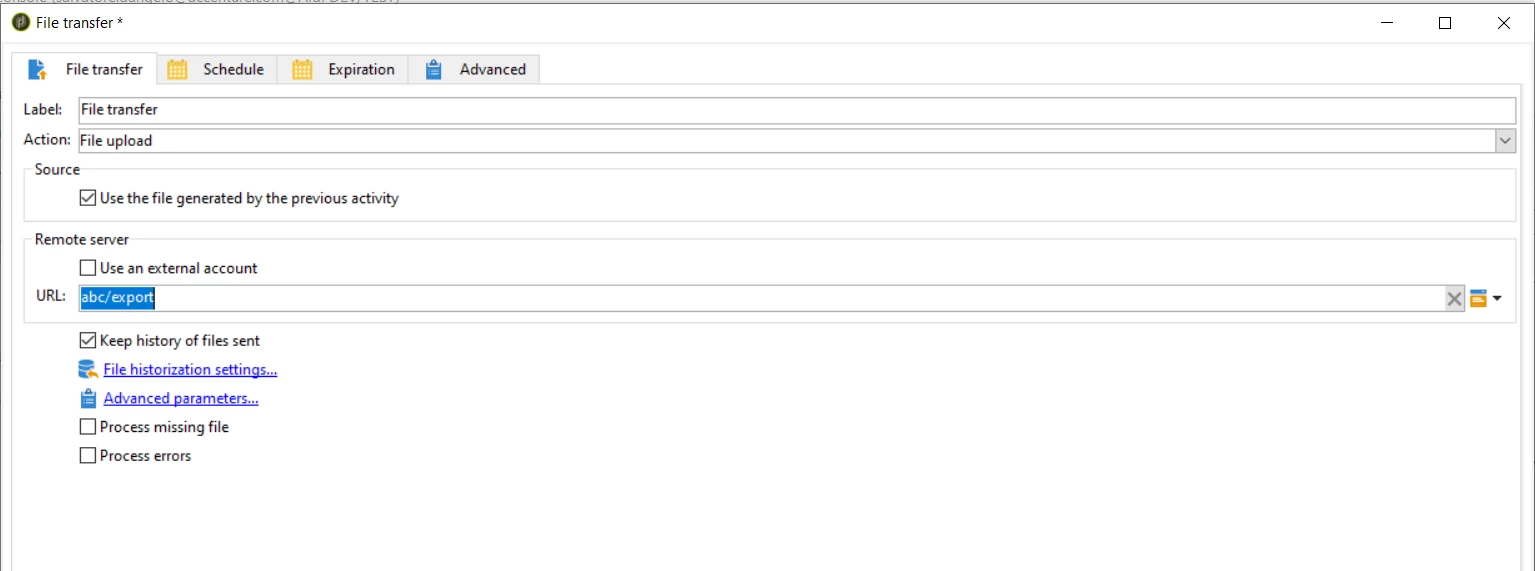
 

could you tell me what I need to insert in place of "abc" ? 


The idea is to create a file during the workflow execution and attach it to a delivery as explained here:
https://experienceleaguecommunities.adobe.com/t5/adobe-campaign-standard/creating-a-calculated-attachment-where-file-name-is-computed-at/qaq-p/253991


Thanks,
Salvatore


FYI @jonathon_wodnicki @jean-serge_biro @kapilkochar @anita_punmiya @milan_vucetic + @Adobe Campaign Community


This post is no longer active and is closed to new replies. Need help? Start a new post to ask your question.
Best answer by Jonathon_wodnicki

Hi,


If the env is fully hosted by Adobe, then the primary app server is the sftp host; in which no file transfer is needed, just reference the file wherever it is.

The linked post is describing that scenario: a file is uploaded via sftp, then its local path is entered into the attachment dialog. 

If you're in a non-Adobe-hosted environment, check with local IT to see what's available.


Thanks,

-Jon

2 replies

Jonathon_wodnicki
Community Advisor
Jonathon_wodnickiCommunity AdvisorAccepted solution
Community Advisor
June 16, 2020

Hi,


If the env is fully hosted by Adobe, then the primary app server is the sftp host; in which no file transfer is needed, just reference the file wherever it is.

The linked post is describing that scenario: a file is uploaded via sftp, then its local path is entered into the attachment dialog. 

If you're in a non-Adobe-hosted environment, check with local IT to see what's available.


Thanks,

-Jon

isahore
Community Advisor
Community Advisor
June 18, 2020

Hi @salvatore_dange ,

Hope you are well.


You don't need a file transfer activity here. Just use the data extraction activity and the delivery in the next step. Like this:

In your delivery, specify the attachment as follows:


Hope this helps.


Thanks,

Ishan