Union activity count differs | Community
Skip to main content
Level 5
January 9, 2024
Solved

Union activity count differs

  • January 9, 2024
  • 1 reply
  • 816 views

Hi there, 


I have two query activities with targeting dimension & filtering dimensions as the recipient
and in my queries the query data is linked to different schemas that output feature name associated to a particular model

one query generated 394 count
another query 191

i am trying to combine the results by using the union.
When I use keys only it give 566

when I use all shared columns it's giving 580.

Does that means there are duplicates?
please suggest how to pass the entire data

This post is no longer active and is closed to new replies. Need help? Start a new post to ask your question.
Best answer by ParthaSarathy

Hi @rvnth ,

It is possible in few scenario. Means that few recipients from Query1 meets the same requirement of Query2 as well.

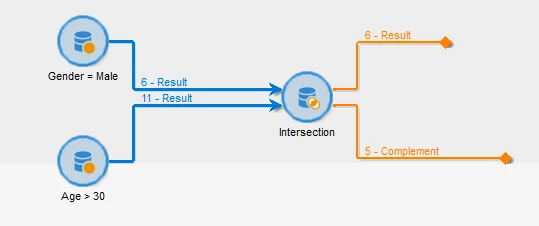
Example, In Query1 if you fetch all Gender equals to Male and in Query2 fetch all recipients age greater than 30, though both filtering conditions are different, few recipients will be part of both Queries. 

If you want to analyze the common records, use intersection activity and select 'keys only' and enable 'generate complement'. you will be getting 19 records in Result transition as per the above example. 

And analyze the Result transition and figure it out why those records are part of your both Queries.

1 reply

ParthaSarathy
Community Advisor
Community Advisor
January 9, 2024

Hi @rvnth ,

Query1 394 and Query2 191, so there are 585 records in total.

When using 'keys only' you got 566 records, because 19 records are common in both queries set.


In order to get all 585 total records as output of Union, try the below steps,

In Query1 > add data > add an output column with alias as @dummy and 'A' as expression.

In Query2 > add data > add an output column with same alias as @dummy and 'B' as expression.


In Union, Select 'All shared columns' and set any of the query as Primary set.

Now you will be getting all the records as output.

~  ParthaSarathy S~  Click here to join ADOBE CAMPAIGN USER GROUP for Quarterly In-person | Hybrid | Virtual Meetups
rvnthAuthor
Level 5
January 9, 2024

Thank you @parthasarathy 


Query1 394 and Query2 191, so there are 585 records in total.

When using 'keys only' you got 566 records, because 19 records are common in both queries set.


The query filters are different for both query 1 & query 2. So I was wondering how come the values are common in both the queries

ParthaSarathy
Community Advisor
ParthaSarathyCommunity AdvisorAccepted solution
Community Advisor
January 9, 2024

Hi @rvnth ,

It is possible in few scenario. Means that few recipients from Query1 meets the same requirement of Query2 as well.

Example, In Query1 if you fetch all Gender equals to Male and in Query2 fetch all recipients age greater than 30, though both filtering conditions are different, few recipients will be part of both Queries. 

If you want to analyze the common records, use intersection activity and select 'keys only' and enable 'generate complement'. you will be getting 19 records in Result transition as per the above example. 

And analyze the Result transition and figure it out why those records are part of your both Queries.

~  ParthaSarathy S~  Click here to join ADOBE CAMPAIGN USER GROUP for Quarterly In-person | Hybrid | Virtual Meetups