Hi @sanjana12 ,
By default in union (keys only reconciliation) will union the target data based on primary key.
If we want to do union based on a particular attribute/field, 'A selection of column' option will be helpful.
The below example might help you getting answer,
There are 2 files,
File1 - address.csv which have customer id and email address
| customer_id | email |
| 123 | test1@test.com |
| 456 | abc@gmail.com |
| 789 | 123@yahoo.com |
File2 - offer.csv which have customer id and offer
| customer_id | offer |
| 789 | offer3 |
| 001 | offer4 |
| 123 | offer1 |
| 456 | offer2 |
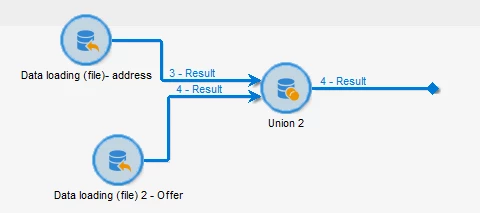
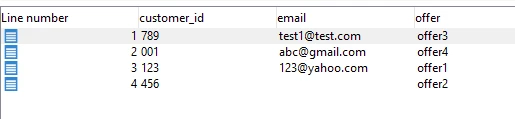
Importing this 2 files, and by selecting 'keys only' in union, offers and email are assigned to customer id based on primary key (here, line number). When you compare with above mentioned file data, this mapping output of union is wrong.
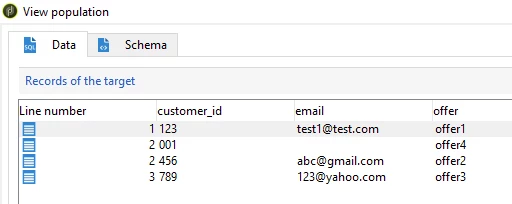
So the correct way to union here is, by selecting 'a selection of column' in reconciliation and selecting 'customer_id' column, we can see the correct mapping of email id - offer and customerId as per files.
~ ParthaSarathy S~ Click here to join ADOBE CAMPAIGN USER GROUP for Quarterly In-person | Hybrid | Virtual Meetups