Understand prepare and start command in ACC | Community
Skip to main content
Level 4
December 14, 2023
Solved

Understand prepare and start command in ACC

  • December 14, 2023
  • 1 reply
  • 1039 views

Hello!

I have a question regarding the "Prepare" and "Prepare and start" options when it comes to delivery and sending out an email.
When using "Prepare and start" will the sendout be sent immediately but when using just "Prepare" then a manual action is needed (confirming the delivery in campaign dashboard for example).

A user did a sendout for some days ago with just Prepare and forgot to confirm it. She confirmed today but I cannot see any changes in the logs and it seems that the sendout is starting:
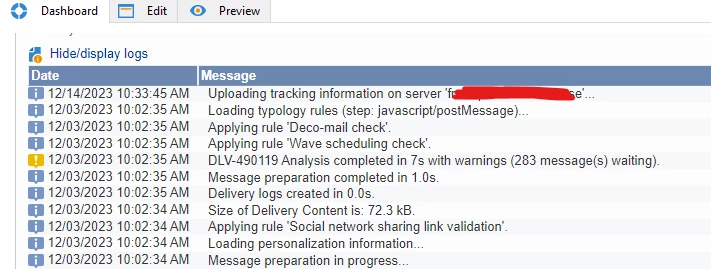


Is it because of this?:
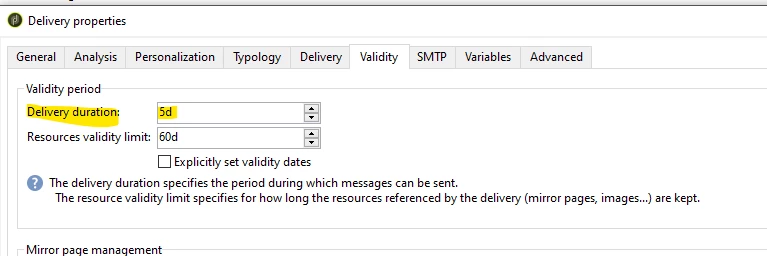

Is it safe to restart the wkf and the sendout from scratch?

This post is no longer active and is closed to new replies. Need help? Start a new post to ask your question.
Best answer by Craig_Thonis

Hi Marcel,

The answer to your question is yes. As the delivery validity has passed, any sending attempts would result in the recipients failing, which you should see in the delivery logs of the delivery.
For good measure, I would ensure that no recipients were sent by reviewing the delivery logs. If none were sent, then recreating the delivery and running the workflow should be safe.


1 reply

Marcel_Szimonisz
Community Advisor
Community Advisor
December 14, 2023

Hello @a_b_se,

prepare runs all the typology rules exclusions, personaliziation of each message etc. and needs to be confirmed.
- prepare and start - will start to send emails

take a look at:
https://experienceleague.adobe.com/docs/campaign-classic/using/automating-with-workflows/action-activities/delivery.html?lang=en

Marcel Szimonisz

A_B_SEAuthor
Level 4
December 14, 2023

Hello Marcel,

I know the difference between the two, I'm asking what caused the issue above.

Thanks

Craig_Thonis
Adobe Employee
Craig_ThonisAdobe EmployeeAccepted solution
Adobe Employee
December 14, 2023

Hi Marcel,

The answer to your question is yes. As the delivery validity has passed, any sending attempts would result in the recipients failing, which you should see in the delivery logs of the delivery.
For good measure, I would ensure that no recipients were sent by reviewing the delivery logs. If none were sent, then recreating the delivery and running the workflow should be safe.