Unable to see HTML error when previewing delivery | Community
Skip to main content
Level 6
September 1, 2023
Solved

Unable to see HTML error when previewing delivery

  • September 1, 2023
  • 1 reply
  • 909 views

Hi, I'm unable to see the HTML error when previewing delivery. What I'm getting is a prompt saying error while evaluating document. Please help

This post is no longer active and is closed to new replies. Need help? Start a new post to ask your question.
Best answer by AkshayAnand

Hi @sanjana12 


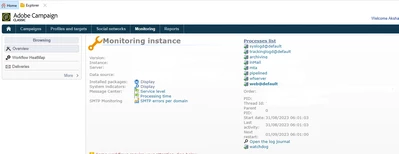
Could you please look into the logs for the exact error under Home >> Monitoring >> Web@Default >> Open Log Journal.


Regards

Akshay

1 reply

Craig_Thonis
Adobe Employee
Adobe Employee
September 1, 2023

Hi Sanjana,

Are you including a specific profile when trying to preview? If so, can you try removing that profile to see if the preview works then? Oftentimes times, when the preview fails, it is because there is an issue displaying personalized content. If it is the only delivery failing to preview, I would recommend taking apart the delivery and building it in pieces while previewing along the way. At the point that it breaks, you can review that area of content to isolate the root cause.

Sanjana12Author
Level 6
September 1, 2023

Hi, I'm getting blank content. But I want to see the HTML error. This is happening for multiple profiles. Please help


AkshayAnand
Community Advisor
AkshayAnandCommunity AdvisorAccepted solution
Community Advisor
September 5, 2023

Hi @sanjana12 


Could you please look into the logs for the exact error under Home >> Monitoring >> Web@Default >> Open Log Journal.


Regards

Akshay