Typology rule and duplication of address in delivery | Community
Skip to main content
Level 4
November 15, 2024
Solved

Typology rule and duplication of address in delivery

  • November 15, 2024
  • 2 replies
  • 932 views

Hello!
I've a question regarding typology rules and other standard filters such as "duplicate address" rule.
Background: I want to insert a master control of 5% for all email communication and I would like to insert it as a SQL based rule in typologies.
Since we have also other usual control groups in some send-outs I want to make sure that the new SQL based rule will be run before the usual control group creation.

I now see that we have a "Duplicate address" check between the SQL rules and the creation of control group and I would like to move it before all SQL rules:
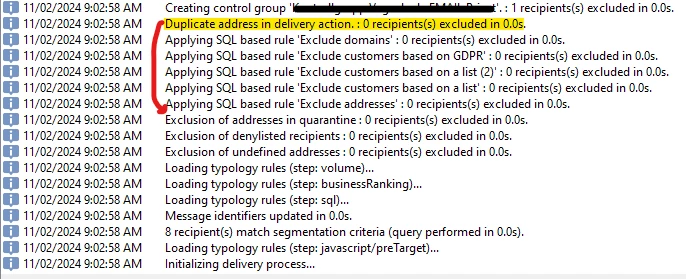
How can I do it? As far as I know this check is the first checkbox here:
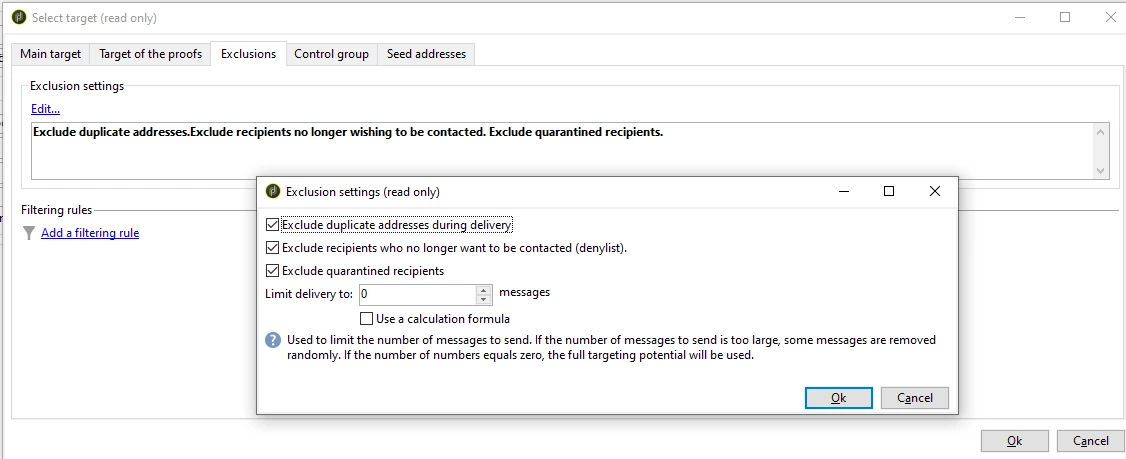
Can someone help me understand how to move the order of this rule for all send-outs?

 

This post is no longer active and is closed to new replies. Need help? Start a new post to ask your question.
Best answer by ParthaSarathy

Hi @a_b_se ,

2 workarounds,

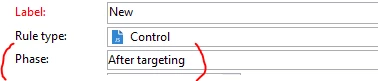
Option 1 - You can Select 'After targeting' in Phase. So this Rules will be applied after Deduplication.

Option 2 - You can create a deduplication activity before the delivery and deduplicate the inbound population based on the address (email for email channel / mobileNumber for SMS and so on). So the 'Duplicate address on delivery action' will be always 0, so it doesn't matter where the rule is applied.


Basically the typology execution order is (Reference document),

In standard operation mode, the rules are applied in the following sequence:

  1. Control rules, if they are applied at the start of targeting.

  2. Filtering rules:

    • Native application rules for address qualification: defined address / non-verified address / address on the denylist / quarantined address / address quality.
    • Filtering rules defined by the user.
    • Deduplication rule on the address or the identifier (applied if necessary).
  3. Pressure rules.

  4. Capacity rules.

  5. Control rules, if they are applied at the end of targeting.

  6. Control rules, if they are applied at the start of personalization. If users rules (filtering / pressure / capacitive) have expired and need recalculating, they will be applied during this step.

  7. Control rules, if they apply at the end of personalization.

When several rules are executed during the same message processing phase, you can configure their execution sequence in the Execution sequence field.

For example, a pressure rule with an execution order of 20 will be executed before a pressure rule with an execution order of 30.

2 replies

somasundaram_h
Community Advisor
Community Advisor
November 15, 2024

Hi @a_b_se have you tried changing the execution order to different value?

A_B_SEAuthor
Level 4
November 15, 2024

the dedup action is not present in the typology:


ParthaSarathy
Community Advisor
ParthaSarathyCommunity AdvisorAccepted solution
Community Advisor
November 20, 2024

Hi @a_b_se ,

2 workarounds,

Option 1 - You can Select 'After targeting' in Phase. So this Rules will be applied after Deduplication.

Option 2 - You can create a deduplication activity before the delivery and deduplicate the inbound population based on the address (email for email channel / mobileNumber for SMS and so on). So the 'Duplicate address on delivery action' will be always 0, so it doesn't matter where the rule is applied.


Basically the typology execution order is (Reference document),

In standard operation mode, the rules are applied in the following sequence:

  1. Control rules, if they are applied at the start of targeting.

  2. Filtering rules:

    • Native application rules for address qualification: defined address / non-verified address / address on the denylist / quarantined address / address quality.
    • Filtering rules defined by the user.
    • Deduplication rule on the address or the identifier (applied if necessary).
  3. Pressure rules.

  4. Capacity rules.

  5. Control rules, if they are applied at the end of targeting.

  6. Control rules, if they are applied at the start of personalization. If users rules (filtering / pressure / capacitive) have expired and need recalculating, they will be applied during this step.

  7. Control rules, if they apply at the end of personalization.

When several rules are executed during the same message processing phase, you can configure their execution sequence in the Execution sequence field.

For example, a pressure rule with an execution order of 20 will be executed before a pressure rule with an execution order of 30.

~  ParthaSarathy S~  Click here to join ADOBE CAMPAIGN USER GROUP for Quarterly In-person | Hybrid | Virtual Meetups