Sep 28, 2020 12:42 PM UTC
Solved

Tracking personalised links in an email

Hello friends,


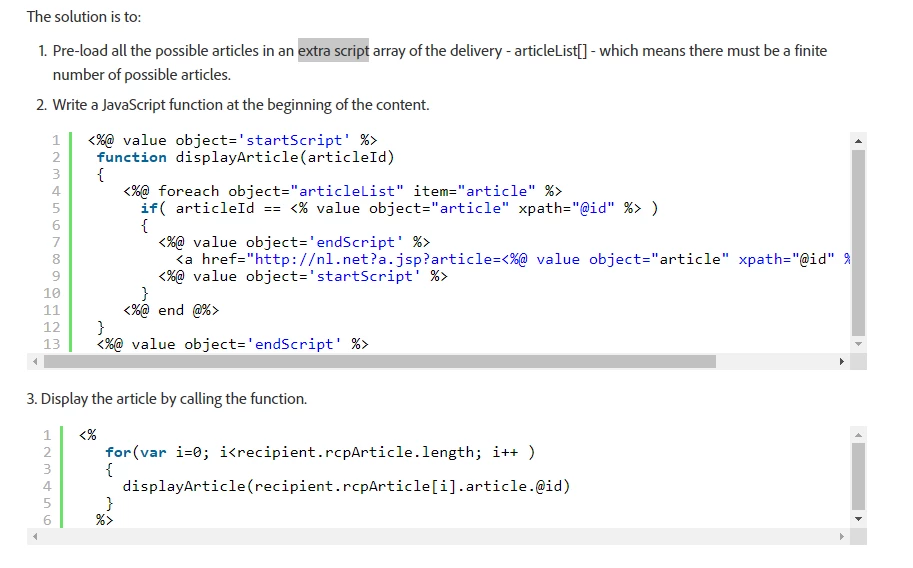
I am trying to make the tracking work for personalised links ( to each recipients). I came across this article - 

https://helpx.adobe.com/campaign/kb/tracking-personnalized-links.html

The solution is at the bottom of the page. 

 Can someone explain how do we pre-load all the records as mentioned in an array list (step 1 in the screenshot)? 


Thanks in advance,

Sonam

This post is no longer active and is closed to new replies. Need help? Start a new post to ask your question.
ChristopheProtatAccepted solution
Adobe Employee
Oct 11, 2020 9:11 PM UTC

Hello Sonam,


This example from the documentation is more a trick, a way hack the fact Personalisation engine comes after Tracking processing. Even if it makes it possible to have different tracking links for reporting purpose, it comes with some limitations. It requires nested loops against your main collection you want to use for personalisation (the one attached to your recipients) and a static array of value you use to build different links (across recipients)


If your use case is just personalisation, I would recommend to not go for this pattern. Classic personalisation will lead to one single dynamic tracking link but remains optimal for delivery preparation processing. If your use case requires to breakdown your tracking links for Reporting or Retargeting purpose, then I would recommend to better look at extending The tracking table and log additional info/attributes when people clicks on the link. That way, you will have additional information to "differentiate" your links. 

Hope it makes sense. 

Christophe
 

2 replies

Jonathon_wodnicki
Community Advisor
Community Advisor
Oct 7, 2020 10:17 PM UTC

Hi,


That syntax is pretty wild. The page you linked consistently says 'array' and gives an example with a simple for() iteration of a js array, so (?):

var articleList = [ <article id="1"/>, <article id="2"/>, <article id="3"/>, ];


Can also try ordinary XML list:

var articleList = <articles> <article id="1"/> <article id="2"/> <article id="3"/> <articles>;


Thanks,

-Jon


Translate
ChristopheProtatAdobe EmployeeAccepted solution
Adobe Employee
Oct 11, 2020 9:11 PM UTC

Hello Sonam,


This example from the documentation is more a trick, a way hack the fact Personalisation engine comes after Tracking processing. Even if it makes it possible to have different tracking links for reporting purpose, it comes with some limitations. It requires nested loops against your main collection you want to use for personalisation (the one attached to your recipients) and a static array of value you use to build different links (across recipients)


If your use case is just personalisation, I would recommend to not go for this pattern. Classic personalisation will lead to one single dynamic tracking link but remains optimal for delivery preparation processing. If your use case requires to breakdown your tracking links for Reporting or Retargeting purpose, then I would recommend to better look at extending The tracking table and log additional info/attributes when people clicks on the link. That way, you will have additional information to "differentiate" your links. 

Hope it makes sense. 

Christophe


Translate