The Year field with value '2023-05-12' in '2023-05-12 18:09:07.825146' is too long | Community
Skip to main content
Level 6
September 21, 2023
Solved

The Year field with value '2023-05-12' in '2023-05-12 18:09:07.825146' is too long

  • September 21, 2023
  • 1 reply
  • 637 views

I don't have a column Year on my data, but I think it is taken the year from my column: "date_creation". 

How can I remove the miliseconds from my column "date_creation" to avoid this warnings? Or Should I fix this in the source of the data? I get a csv file to upload to campaign.


 

This post is no longer active and is closed to new replies. Need help? Start a new post to ask your question.
Best answer by ParthaSarathy

Hi @god_prophet ,

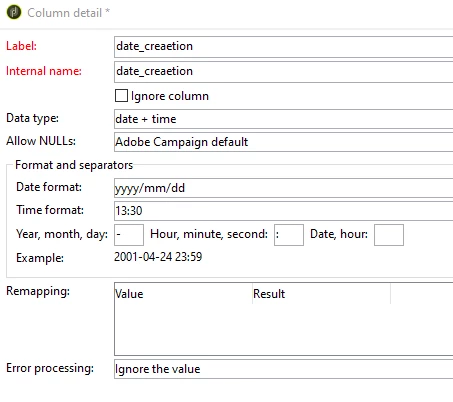
For the date_creation column, in data loading activity configure the date+time format as below,

Run the workflow and check. Or If you are able to change the values in input file, you can handle there. 


Or else you can try below approach as well,

In data Loading activity, instead of defining it as date+time, define it as 'string'.

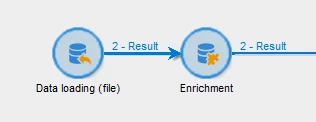
Connect data loading transition with enrichment activity.


Enrichmet:

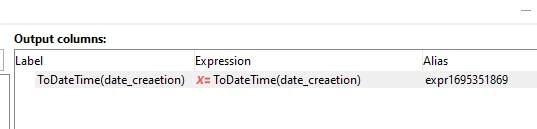
Add data > add an output column in it with below expression,


ToDateTime(date_creation)


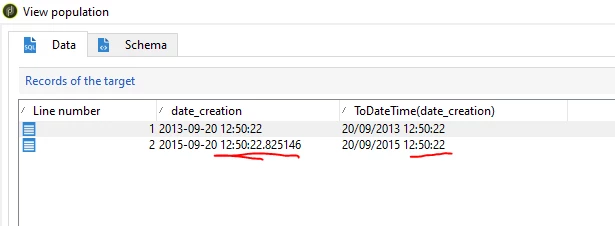
Now the new field created in enrichment, will remove the millisecond.

1 reply

ParthaSarathy
Community Advisor
ParthaSarathyCommunity AdvisorAccepted solution
Community Advisor
September 22, 2023

Hi @god_prophet ,

For the date_creation column, in data loading activity configure the date+time format as below,

Run the workflow and check. Or If you are able to change the values in input file, you can handle there. 


Or else you can try below approach as well,

In data Loading activity, instead of defining it as date+time, define it as 'string'.

Connect data loading transition with enrichment activity.


Enrichmet:

Add data > add an output column in it with below expression,


ToDateTime(date_creation)


Now the new field created in enrichment, will remove the millisecond.

~  ParthaSarathy S~  Click here to join ADOBE CAMPAIGN USER GROUP for Quarterly In-person | Hybrid | Virtual Meetups
Level 6
October 25, 2023

Hi @parthasarathy , how do you get to this screen? 


ParthaSarathy
Community Advisor
Community Advisor
October 26, 2023

@god_prophet ,

Data Loading activity > Click here to change the file format > double click your date column or select your date field  and click details button on the right side.

~  ParthaSarathy S~  Click here to join ADOBE CAMPAIGN USER GROUP for Quarterly In-person | Hybrid | Virtual Meetups