Testing Transactional Messages using post man | Community
Skip to main content
Level 4
September 19, 2022
Solved

Testing Transactional Messages using post man

  • September 19, 2022
  • 2 replies
  • 2762 views

Hi Team,


in ACC i have created an event type, transactional email template, configured and published it, can any help me on next steps how to test using the post man tool. 


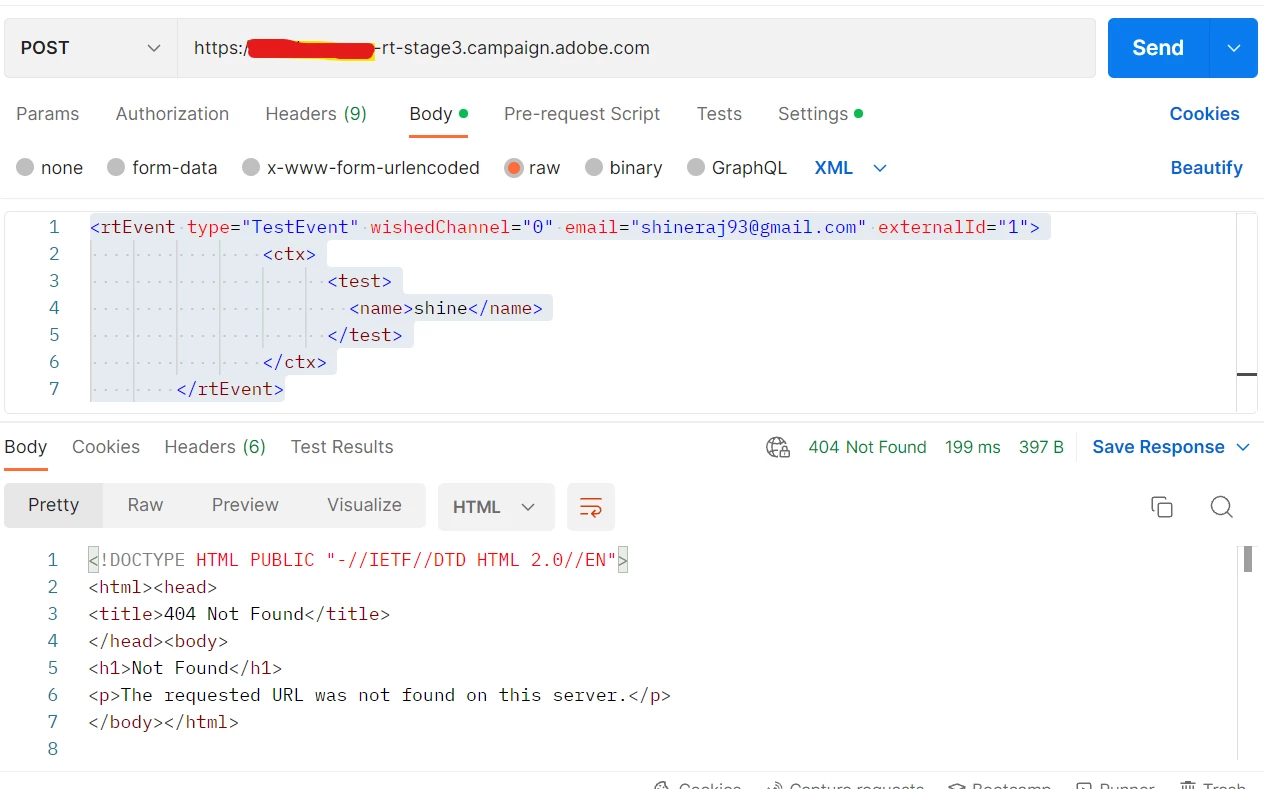
i have configured done the below configurations and when i click on send i get a 404 error response.


can anyone let me know what is the mistake that i have done?


Thanks in advance,


Regards,

Shine v.v 

This post is no longer active and is closed to new replies. Need help? Start a new post to ask your question.
Best answer by dev_abhinav

Hi @david--garcia , @dev_abhinav ,


Thank you for your help and support, i was able to send a transactional Email from post and received the email as well. since this was implemented for the first time all the technical workflows related to transactional messages were not started, which was also one of the issue. The operator MC had a different password which was an issue. 


I have separate login collection in post man one for (session token and security token) and the other for push event from the (WSDL File of nms:rtEvent). Where i am manually making use of the (session token and security token) from the login SOAP API call and then calling the Push Event to send the Email from post man,


i have shared both the collections and the WSDL file to the third party team. They are asking for a login WSDL and i am not sure where to get the login WSDL file from. can anyone help me out?


Thanks,

Shine v.v


Hi @shinev_ ,

Not sure If I get this but there is no LOGIN WSDL, you can generate your session token using logon and use that generated session token.

Below:-


Use WSDL generated from 

https://<server>/nl/jsp/schemawsdl.jsp?schema=xtk:session

-> LOGON to generate Session using MC operator


Now WSDL from 

https://<server>/nl/jsp/schemawsdl.jsp?schema=nms:rtEvent


->PushEvent use generated session token and payload to send and receive messages.


Hope this helps!
 

2 replies

Level 2
September 20, 2022

Hi @shinev_ ,

You need to import the WSDL file in postman to test the same.

How to get WSDL file in adobe campaign.


david--garcia
Level 10
September 20, 2022

The payload should be as folloing


The headers -->


POST https://<instance>.campaign.adobe.com/nl/jsp/soaprouter.jsp

Content-Type : application/xml

<soapenv:Envelope xmlns:soapenv="http://schemas.xmlsoap.org/soap/envelope/" xmlns:urn="urn:nms:rtEvent">
   <soapenv:Header/>
   <soapenv:Body>
      <urn:PushEvent>
         <urn:sessiontoken>loginor session tokenhere</urn:sessiontoken>
         <urn:domEvent>
            <rtEvent type="eventypehere" wishedChannel="1" mobilePhone="+000000" email="email@email.com" externalId="recipientcodehere" origin="originatingsystemhere">
             <ctx>
               <something>test</something
             </ctx>
            </rtEvent>
         </urn:domEvent>
      </urn:PushEvent>
   </soapenv:Body>
</soapenv:Envelope>
ShineV_Author
Level 4
September 27, 2022

Hi @david--garcia , @dev_abhinav 

Thank you for your response,  i have tried using the same method, i am now not getting a login error, i am getting the response a long number but no email is triggered and unable to see any record in the event history, attached the screenshot of the response, any idea why this is happening? thanks in advance.


Thanks,

Shine v.v

Level 2
September 27, 2022

hi @shinev_ , 

from the screenshot attached the payload is missing wishedchannel .

please refer below 

use wishedChannel="0" for email and wishedChannel="1" for sms

----------------------------------------------------------------------------------

<?xml version="1.0" encoding="utf-8"?>
<soap:Envelope xmlns:soap="http://schemas.xmlsoap.org/soap/envelope/">
    <soap:Body>
        <PushEvent xmlns="urn:nms:rtEvent">
            <sessiontoken>YOUR SESSION TOKEN</sessiontoken>
            <urn:domEvent>
                <rtEvent type="EVENTNAME" email="EMAIL" wishedChannel="0">
                    <ctx>
                        
                    </ctx>
                </rtEvent>
            </urn:domEvent>
        </PushEvent>
    </soap:Body>
</soap:Envelope>
 
-------------------------------------------------------------------------------------
 
let me  know if this helps!