TEST A/B javascript code | Community
Skip to main content
Level 3
November 14, 2023
Solved

TEST A/B javascript code

  • November 14, 2023
  • 2 replies
  • 1657 views

Hi,


I am trying to use the javascript code included in the documentation to get the winner in base of opens, and it is not working. Is anything wrong with it?


I will leave it here: https://experienceleague.adobe.com/docs/campaign-classic/using/sending-messages/a-b-testing/use-case/a-b-testing-uc-script.html?lang=en 
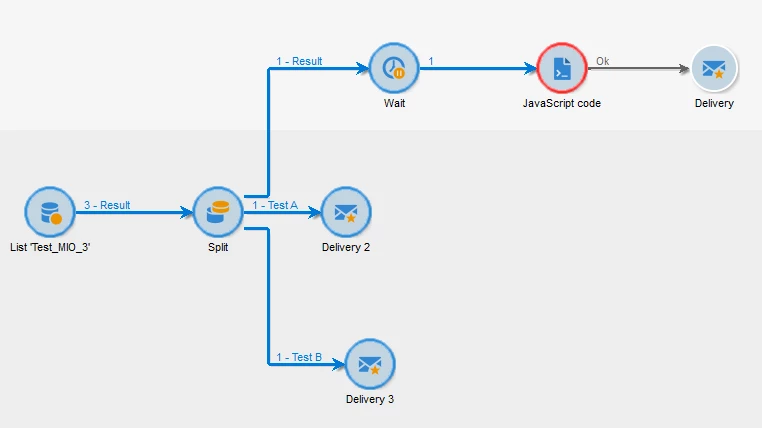
 

I did a copy-paste, so if I am missing any step, please let me know!

Thank you very much as always 🙂

This post is no longer active and is closed to new replies. Need help? Start a new post to ask your question.
Best answer by ParthaSarathy

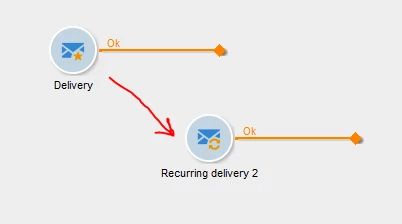
@bcollado , Instead of using this Delivery activity (Star icon delivery which you had currently used), replace it with Recurring delivery activity and run the workflow. (Make sure you're creating this in a campaign workflow)


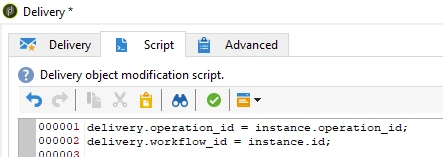
Still If you want to use a Star icon Delivery (delivery2 and delivery3 of your workflow), then in its script tab, add the below code


delivery.operation_id = instance.operation_id; delivery.workflow_id = instance.id;


Amine has mentioned the same. You need to use this script in delivery's script tab.

Alternatively, you can also replace this activity with Recurring Delivery and no need of external script to be added.

2 replies

Amine_Abedour
Community Advisor
Community Advisor
November 14, 2023

Hello @bcollado,

The reason why it's not working is that you used the delivery activity that call a delivery model. The generated deliveries are not linked to the workflow. 

Add the bellow script to the initialization script of your delivery activities.

it should link the created deliveries to the workflow and to the operation.

delivery.operation_id = instance.operation_id; delivery.workflow_id = instance.id;

 Br,

Amine

Amine ABEDOUR
bcolladoAuthor
Level 3
November 14, 2023

Hi,


you mean like this?


I do not understand properly when you say I have to link the created deliveries to the workflow and to the operation... need more details please and thanks!

ParthaSarathy
Community Advisor
Community Advisor
November 14, 2023

Hi @bcollado ,

If you had followed and copied the same script from the documentation, edit the label of JavaScript activity and change it as <%= vars.deliveryId %> (as mentioned in point-3).


Run the workflow again, and if you get any error, share the screenshot of error.

~  ParthaSarathy S~  Click here to join ADOBE CAMPAIGN USER GROUP for Quarterly In-person | Hybrid | Virtual Meetups
bcolladoAuthor
Level 3
November 14, 2023

Hi!


it is not working as you can see in the picture

😞

ParthaSarathy
Community Advisor
ParthaSarathyCommunity AdvisorAccepted solution
Community Advisor
November 14, 2023

@bcollado , Instead of using this Delivery activity (Star icon delivery which you had currently used), replace it with Recurring delivery activity and run the workflow. (Make sure you're creating this in a campaign workflow)


Still If you want to use a Star icon Delivery (delivery2 and delivery3 of your workflow), then in its script tab, add the below code


delivery.operation_id = instance.operation_id; delivery.workflow_id = instance.id;


Amine has mentioned the same. You need to use this script in delivery's script tab.

Alternatively, you can also replace this activity with Recurring Delivery and no need of external script to be added.

~  ParthaSarathy S~  Click here to join ADOBE CAMPAIGN USER GROUP for Quarterly In-person | Hybrid | Virtual Meetups