Jan 22, 2021 3:05 PM UTC
Solved

targetData in a direct delivery template

Hello.

I am facing a problem when creating a direct delivery template.
I want to add some columns to the extraction file and collect this values from the targetData.

Here is a part of the extraction file:

Output columns: (notice they have alias assigned:

targetData:
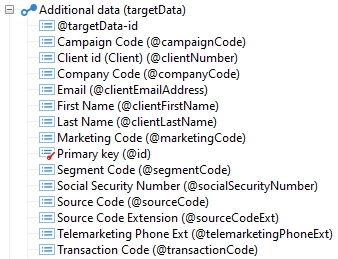
 

What I want to accomplish is that the targetData value goes to the output column without the need of assigned manually.


I was hoping that if I create a query and add some extra fields and assigned a alias per field, this fields will auto added to the output columns (from the extraction file) without the need to assigned manually.


Hope someone can help me out.


Thanks



This post is no longer active and is closed to new replies. Need help? Start a new post to ask your question.
Milan_Vucetic
Milan_VuceticAccepted solution
Level 9
Jan 25, 2021 7:18 PM UTC

Hi @malanga1985 

you have defined these columns with empty value inside. You cannot expect to be overwriten.

Instead, if you are sure these columns are always there just select them as other columns in output.

Regards,

Milan


5 replies

Milan_Vucetic
Milan_VuceticAccepted solution
Level 9
Jan 25, 2021 7:18 PM UTC

Hi @malanga1985 

you have defined these columns with empty value inside. You cannot expect to be overwriten.

Instead, if you are sure these columns are always there just select them as other columns in output.

Regards,

Milan


Translate
Jan 25, 2021 8:15 PM UTC
Is there a way to put a default value if the column does not exists?
Translate
Jan 25, 2021 8:20 PM UTC

Is there a way to put a default value if the column does not exists? or Do I need to create it like:

IsEmptyString(NoNull([targetData/@test]),'',[targetData/@test] ) ?

Thanks

Translate