This post is no longer active and is closed to new replies. Need help? Start a new post to ask your question.
ParthaSarathy
ParthaSarathyAccepted solution
Community Advisor
August 4, 2022

Hi @saurabhjoshi ,

Try Below Query,

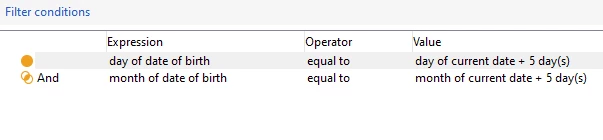
Day(@birthDate) EQUAL TO Day(AddDays( GetDate() , 5))

AND

Month(@birthDate) EQUAL TO Month(AddDays( GetDate() , 5))


So, When the workflow runs today (4th August), Recipients who has birthday on 9th August will be targeted today (4th August).


Regards,

ParthaSarathy

~  ParthaSarathy S~  Click here to join ADOBE CAMPAIGN USER GROUP for Quarterly In-person | Hybrid | Virtual Meetups

4 replies

Adobe Employee
August 4, 2022

Hi,


You could send the email today and date of birth is today plus 5 days. Will this work for your case?

Translate
ParthaSarathy
Community Advisor
ParthaSarathyCommunity AdvisorAccepted solution
Community Advisor
August 4, 2022

Hi @saurabhjoshi ,

Try Below Query,

Day(@birthDate) EQUAL TO Day(AddDays( GetDate() , 5))

AND

Month(@birthDate) EQUAL TO Month(AddDays( GetDate() , 5))


So, When the workflow runs today (4th August), Recipients who has birthday on 9th August will be targeted today (4th August).


Regards,

ParthaSarathy

Translate
~  ParthaSarathy S~  Click here to join ADOBE CAMPAIGN USER GROUP for Quarterly In-person | Hybrid | Virtual Meetups
David_Loyd
Adobe Employee
Adobe Employee
August 5, 2022

Don't forget to schedule this workflow to run daily.

Translate