Store the data form HttpClientRequest | Community
Skip to main content
Level 2
October 20, 2022
Solved

Store the data form HttpClientRequest

  • October 20, 2022
  • 1 reply
  • 776 views

Hello, im working on a HttpClientRequest in Adobe Campaign. I've built a javascript node that will handle this. I have a succesfull response that I am able to see as a JSON object when I logInfo.


The base of the request (example):


var http = new HttpClientRequest("https://blablablac.net/CRM/Report/Test/ViewingDate?ViewingStartDate=2022-08-18T12:00:00&ViewingEndDate=2022-09-01T12:00:00&PageSize=0&PageIndex=0") var buffer = new MemoryBuffer() buffer.fromString("1Username1" + ':' + "password123123123123", "iso-8859-1") http.header["Authorization"] = "Basic " + buffer.toBase64(); http.header["Content-Type"] = "text/xml; charset=utf-8"; http.method = "GET"; http.execute(); var resp = http.response; var post = JSON.parse(resp.body); logInfo(resp.body);


But how to I actually store the data from this response into a Adobe Campaign Schema? I want to do a for loop running through all the rows and then store each of variables from the object into my schema in adobe campaing. Can't find a good example for this.


Thanks in advanced,

Martin

This post is no longer active and is closed to new replies. Need help? Start a new post to ask your question.
Best answer by Shubham_Goyal__

Hi @marting66652718,


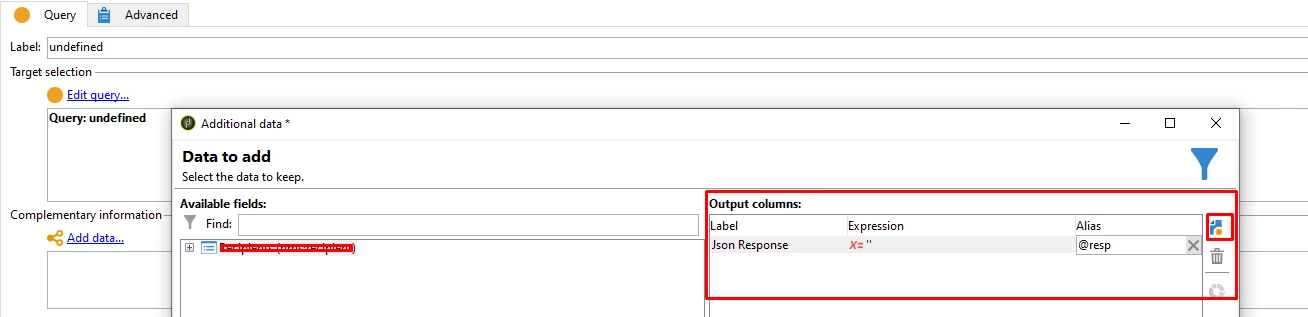
To store this data from the variable you can first declare an empty column say 'Json Response' (resp) and then use the WRITE function to update data in this column of the temp table of workflow, using a Js code. Now you can run this Write function in the loop for each row. Once the data is inserted in the column for all rows then you can use the 'Update data' activity to insert it in your desired table. 🙂
Link to seek more info on Data Oriented API's

My random example based on your case:


Js Code (example - I just used some @id as join condition which may vary in your case of Join):

xtk.session.Write(<enrich xtkschema="temp:query" id={id} _key="@id" _operation="update" resp={resp.body}/>);

Or may use SQL function and inserts data in the column of temp table:(example)

    var sql = "UPDATE  "+vars.tableName+" SET sResp= '"+resp.body+"' where <join condition>;
    sqlExec(sql);

Br,

Shubham


1 reply

Shubham_Goyal__
Shubham_Goyal__Accepted solution
Level 6
October 21, 2022

Hi @marting66652718,


To store this data from the variable you can first declare an empty column say 'Json Response' (resp) and then use the WRITE function to update data in this column of the temp table of workflow, using a Js code. Now you can run this Write function in the loop for each row. Once the data is inserted in the column for all rows then you can use the 'Update data' activity to insert it in your desired table. 🙂
Link to seek more info on Data Oriented API's

My random example based on your case:


Js Code (example - I just used some @id as join condition which may vary in your case of Join):

xtk.session.Write(<enrich xtkschema="temp:query" id={id} _key="@id" _operation="update" resp={resp.body}/>);

Or may use SQL function and inserts data in the column of temp table:(example)

    var sql = "UPDATE  "+vars.tableName+" SET sResp= '"+resp.body+"' where <join condition>;
    sqlExec(sql);

Br,

Shubham