Level 4
Feb 1, 2022 6:45 AM UTC
Solved

Show paragraph text in webpage in next line and with space

Hi All,


I have created 2 webpages. In 1st webpage we are customizing and giving information which should be reflected in the 2nd webpage.

So the process is in 1st webpage I am entering a field called Introduction with <textarea> tag (used <textarea> because the introduction can be 2-3 paragraphs). 

From 1st webpage I am entering introduction with multiple paragraphs . This data gets stored in a schema in adobe and respectively 2nd webpage will contain this introduction which was given in the 1st webpage.

The problem is in the 2nd webpage I am not able to replicate the introduction same as  entered in the 1st webpage(the paragraphs are not coming in the next line).


Introduction given in 1st webpage:
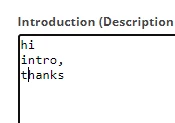
 

Introduction shown in the 2nd webpage

 

Is there a way in which i can show the paragraph way in the 2nd webpage?

@debtr @_manoj_kumar_ @jyoti_yadav @davidkangni 

Thanks

This post is no longer active and is closed to new replies. Need help? Start a new post to ask your question.
Greeshma_Sampath1Accepted solution
Level 4
Feb 11, 2022 1:31 PM UTC

Hi All,


I was able to achieve this by giving the below tag inside my webpage.

<textarea name="intro" class="inputwidth" id="intro" onblur="document.controller.setValue('/ctx/vars/space', this.value.replace(/\n/g,'<br>'), 'intro')" placeholder="Introduction" rows="10" cols="50" type="text">Introduction</textarea></div>

Used <textarea> tag instead of <input> and gave onblur tag inside it.


Thank you everyone for all the suggestions.


7 replies

Jyoti_Yadav
Level 8
Feb 1, 2022 6:52 AM UTC

Hi @greeshma_sampath1 ,


How is data stored in your table? You will be able to show paragraphs if it is saved in that way in the table.

I will suggest save <br> tags before each paragraph begins..


Thanks,

Jyoti

Translate
Level 4
Feb 1, 2022 7:06 AM UTC

Hi @jyoti_yadav 

Thank you for the response.

I am storing the data in schema as a text field. So while entering the data the client should enter <br> also right . So to avoid that is there a  away?

Thanks

Translate
Manoj_Kumar
Community Advisor
Community Advisor
Feb 1, 2022 6:59 AM UTC

Hello @greeshma_sampath1 


You can use a rich text editor (like summernote) in the textarea.


Documentation is available here:

https://summernote.org/getting-started/


Thanks,

Manoj


Translate
Manoj  | https://themartech.pro
Level 4
Feb 1, 2022 12:59 PM UTC

Hi @_manoj_kumar_ ,


Thank you for the response.

Will try this.


thanks

Translate
Kishore_Padamata
Adobe Employee
Adobe Employee
Feb 4, 2022 5:59 PM UTC

Hello @greeshma_sampath1 
Try displaying the variable within pre tag

<pre>xxxx xxxx</pre>

Hope this helps!

Translate
Greeshma_Sampath1AuthorAccepted solution
Level 4
Feb 11, 2022 1:31 PM UTC

Hi All,


I was able to achieve this by giving the below tag inside my webpage.

<textarea name="intro" class="inputwidth" id="intro" onblur="document.controller.setValue('/ctx/vars/space', this.value.replace(/\n/g,'<br>'), 'intro')" placeholder="Introduction" rows="10" cols="50" type="text">Introduction</textarea></div>

Used <textarea> tag instead of <input> and gave onblur tag inside it.


Thank you everyone for all the suggestions.


Translate