Set the folder label by default when creating new folders | Adobe Higher Education
Skip to main content
Level 2
April 27, 2021
Répondu

Set the folder label by default when creating new folders

Hello!


I need to set up a default logic when we create a new folder in the explorer view then, the folder label should change to this example below:
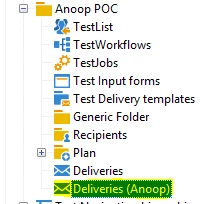


Meaning the text --> (Anoop) should get appended to Deliveries folder.


I tried to set this in deliveries schema by using -> default = "NewLabel()+' (Anoop)'" which did not work.

Also, tried to set the label in delivery input form which did not work as well.


Could you please help me and correct me where I'm doing it wrong or if I have missed anything.


Thank you,

Anoop

 

Ce sujet a été fermé aux réponses.
Meilleure réponse par DebTr

Hi @anoopa24021992 ,

You can try the following.

1. Extend the nms:core navigation hierarchy. You can rename it to a different namespace.

2. Go to the extended nav hierarchy and rename the label of node model as following.(I have appended " 123")

3. Clear local cache. Log off and try to log back in.

4. Thy to create a new deliveries folder.


I am not sure if there is any other config and better ways to do it. But this works.


Cheers,

Deb

2 commentaires

DebTrRéponse
Level 6
April 28, 2021

Hi @anoopa24021992 ,

You can try the following.

1. Extend the nms:core navigation hierarchy. You can rename it to a different namespace.

2. Go to the extended nav hierarchy and rename the label of node model as following.(I have appended " 123")

3. Clear local cache. Log off and try to log back in.

4. Thy to create a new deliveries folder.


I am not sure if there is any other config and better ways to do it. But this works.


Cheers,

Deb

Sukrity_Wadhwa
Community Manager
Community Manager
May 5, 2021

Hi @anoopa24021992,

Were you able to resolve this query or do you still need more help here? Do let us know.

Thanks!

Sukrity Wadhwa