Set template to a Delivery Activity using a JavaScript code activity | Community
Skip to main content
CampaignerForLife
Level 5
March 22, 2023
Solved

Set template to a Delivery Activity using a JavaScript code activity

  • March 22, 2023
  • 1 reply
  • 1614 views

Hi, I would like to know if there is a way to set one delivery activity template using JavaScript code by sending the Delivery template internal name or label. 


Case of use example: 


"I've a list of Recipients with different languages. I loop at them and, for every one, I use an If to select one template name or another. After it, I send it to the delivery activity to have one kind of email or another. "


Also, is there any better way to do this?



This post is no longer active and is closed to new replies. Need help? Start a new post to ask your question.
Best answer by Manoj_Kumar

Hello @campaignerforlife 


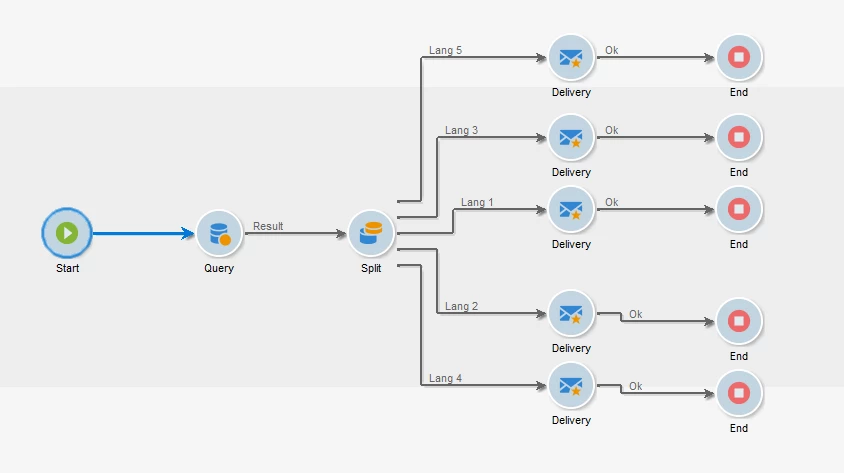
The best solution would be to split the audience into different segments depending on the language and then use separate delivery for each segment.


Something like this:


If you want to use a single delivery then you can split the audience into different segments and give them a unique segment code. In the delivery use multiple if-else conditions to change the content on the basis of segment code.


In this case, the WF will look like this:


The dynamic condition code would look like this:

<% if(targetData.@segmentCode=='LANG1') { %> Personalization block or content for LANG 1 <% } else if if(targetData.@segmentCode=='LANG2') { %> Personalization block or content for LANG 2 <% } else if if(targetData.@segmentCode=='LANG\3') { %> Personalization block or content for LANG 3 <% } else if if(targetData.@segmentCode=='LANG4') { %> Personalization block or content for LANG 4 %> } else{ %> Fallback content <% } %>


1 reply

Manoj_Kumar
Community Advisor
Manoj_KumarCommunity AdvisorAccepted solution
Community Advisor
March 22, 2023

Hello @campaignerforlife 


The best solution would be to split the audience into different segments depending on the language and then use separate delivery for each segment.


Something like this:


If you want to use a single delivery then you can split the audience into different segments and give them a unique segment code. In the delivery use multiple if-else conditions to change the content on the basis of segment code.


In this case, the WF will look like this:


The dynamic condition code would look like this:

<% if(targetData.@segmentCode=='LANG1') { %> Personalization block or content for LANG 1 <% } else if if(targetData.@segmentCode=='LANG2') { %> Personalization block or content for LANG 2 <% } else if if(targetData.@segmentCode=='LANG\3') { %> Personalization block or content for LANG 3 <% } else if if(targetData.@segmentCode=='LANG4') { %> Personalization block or content for LANG 4 %> } else{ %> Fallback content <% } %>


Manoj  | https://themartech.pro
CampaignerForLife
Level 5
March 22, 2023

Thanks for your answer. Is there any way to set the  Template (And other activities config) using JS code) 

Manoj_Kumar
Community Advisor
Community Advisor
March 22, 2023

Hello @campaignerforlife 


If you are using the start delivery from the actions tab.

Then you can use the script tab to dynamically select the template id.

example code:

delivery.scenario-cs=TEMPLATE_ID; delivery.scenario-id=TEMPLATE_ID delivery.save();


Manoj  | https://themartech.pro