Sending in Waves | Community
Skip to main content
michaelr8873103
Level 2
August 16, 2019
Solved

Sending in Waves

  • August 16, 2019
  • 2 replies
  • 4083 views

I have sent an email in waves, and instead of sending 10% every 10 minutes its sending 10 emails every 10 minutes... this is a problem as their is over 25k emails to send.

Is there a way to force delivery all deliveries? Or do I have to cancel the delivery and send to those not delivered?

Thanks

This post is no longer active and is closed to new replies. Need help? Start a new post to ask your question.
Best answer by Anita_punmiya

Hi Michael,

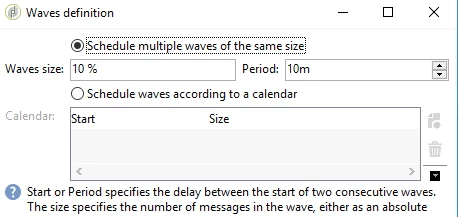
For your requirement , you need to define "10 %" of your targeting audience while defining the waves as below:

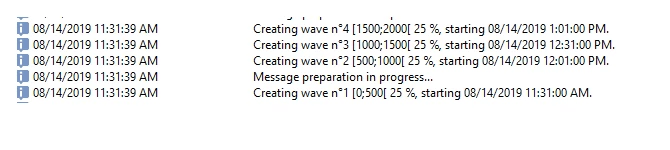
Also, you can always check the audit tab of the delivery to verify if your count in the waves is as expected :

Below is one such example:

Once the deliveries are sent out , you can pause/stop them before the next set of wave is executed.

But to start over again and send deliveries to the remaining audience, you got to exclude the one's already sent out in your workflow.

Hope this helps.

Regards,

Anita

2 replies

Anita_punmiya
Anita_punmiyaAccepted solution
Level 5
August 19, 2019

Hi Michael,

For your requirement , you need to define "10 %" of your targeting audience while defining the waves as below:

Also, you can always check the audit tab of the delivery to verify if your count in the waves is as expected :

Below is one such example:

Once the deliveries are sent out , you can pause/stop them before the next set of wave is executed.

But to start over again and send deliveries to the remaining audience, you got to exclude the one's already sent out in your workflow.

Hope this helps.

Regards,

Anita

December 5, 2023

Hi I have a scenario where we need to schedule campaign everyday and the audience size is about 995677 


how can we send emails and what is wave size is it the targeted audience size ? Or number of emails ? 

kindly help