Nov 3, 2021 9:04 AM UTC
Solved

Script Error while accessing Adobe Campaign Reports

Hiya Adobe community,

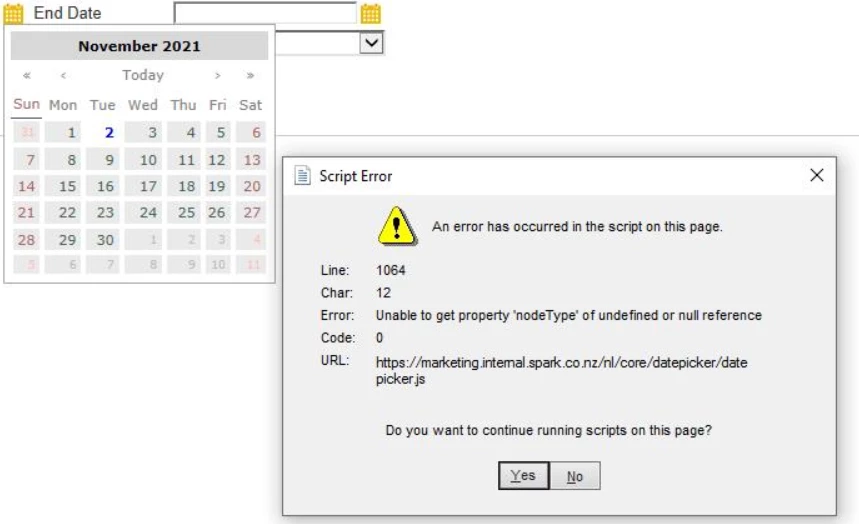
One of our team members has had a script error while trying to access the Campaign reports on Adobe Campaign windows client version 9188. Below is the error snippet. Any leads on what could be the issue ? The error prompt keeps popping each time he hits 'Yes'.

FYI, we use a Hybrid Model of Adobe servers and have our web and marketing servers hosted on prem, if it helps.

Regards,

Faheem


This post is no longer active and is closed to new replies. Need help? Start a new post to ask your question.
Craig_Thonis
Craig_ThonisAccepted solution
Adobe Employee
Nov 4, 2021 12:42 PM UTC

Hi Trex,


This is a bug in your current version of Campaign. Please reach out to Campaign Support to get the latest version of Campaign and start the upgrade process.


The defect reference is NEO-31453.


Regards,

Craig

1 reply

Craig_Thonis
Adobe Employee
Craig_ThonisAdobe EmployeeAccepted solution
Adobe Employee
Nov 4, 2021 12:42 PM UTC

Hi Trex,


This is a bug in your current version of Campaign. Please reach out to Campaign Support to get the latest version of Campaign and start the upgrade process.


The defect reference is NEO-31453.


Regards,

Craig

Translate