Level 2
Jun 9, 2020 8:25 AM UTC
Solved

Restrictions for universal Tab

Hi everyone,


How can I add restrictions for the universal Tab ?

Scenario : If any workflow operator login's then he should be able to see only his folder specific workflows, this functionality works fine under explorer tab but under Universal Tab i can still see workflows which are created under Profile & Targets folder or Global Administration Folder .Similar thing is happening for Web applications and Recipients . Any suggestions how can i restrict them .
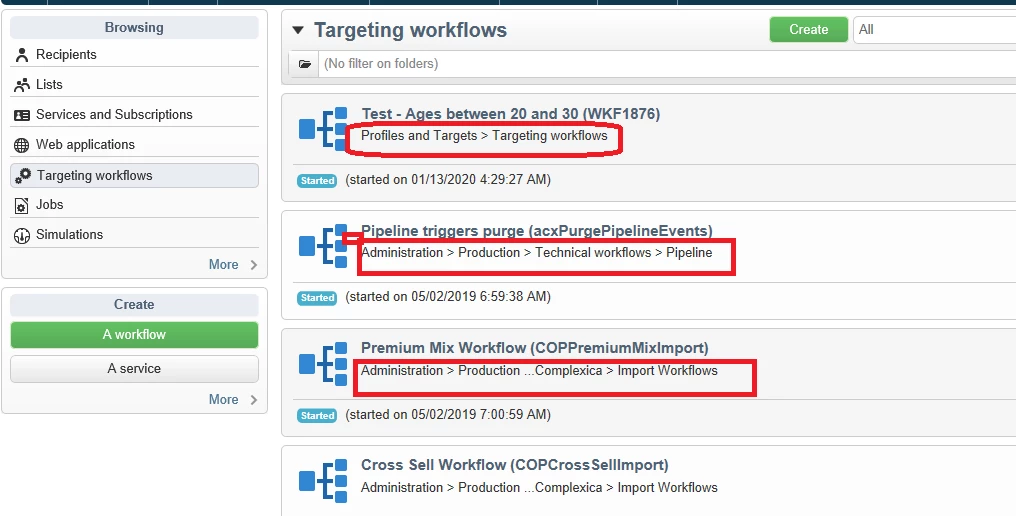
Note : Folder specific permission are already given to workflow operators, campain managers.


Thanks,

Shashank



This post is no longer active and is closed to new replies. Need help? Start a new post to ask your question.
kapilKochar
kapilKocharAccepted solution
Level 6
Jun 9, 2020 12:17 PM UTC

Hi shashank,

I have not done this before but one thing i noticed is that when you click on universal tab and click on workflows/Deliveries then there is a call to JSSP page something like below 


http://<serverIP>:8080/view/workflowOverview?__universe=supervision&__storable=1&__securitytoken=


http://<serverIP>:8080/view/deliveryOverview?__universe=supervision&__storable=1&__securitytoken=


So check this may be this will help you. 


Thanks,

Kapil

6 replies

kapilKochar
kapilKocharAccepted solution
Level 6
Jun 9, 2020 12:17 PM UTC

Hi shashank,

I have not done this before but one thing i noticed is that when you click on universal tab and click on workflows/Deliveries then there is a call to JSSP page something like below 


http://<serverIP>:8080/view/workflowOverview?__universe=supervision&__storable=1&__securitytoken=


http://<serverIP>:8080/view/deliveryOverview?__universe=supervision&__storable=1&__securitytoken=


So check this may be this will help you. 


Thanks,

Kapil

Translate
Manoj_Kumar
Community Advisor
Community Advisor
Jun 9, 2020 3:31 PM UTC

Hello @shashanks445952 ,


You will have to make changes to the Dynamics Javascript Pages to restrict the access.


There are different pages available for each tab. You modify the pages as per your requirement.

Here is the screenshot that shows the location of Dynamic JS Pages:


In these dynamic Javascript pages you can get the operator instance and check for the permissions.


Code to get the Operator ID:

var lOperatorId = Number(request.getParameter("id")); var qDef = <queryDef schema="xtk:operator" operation="getIfExists" ignoreDeleteStatus="true"> <select> <node expr="@id"/> <node expr="[.]"/> <node expr="@lastModified"/> <node expr="DaysDiff(DateOnly(GetDate()), DateOnly(@lastModified))" alias="@lastUpdateInDays"/> <node expr="@name"/> <node expr="@email"/> <node expr="@mobilePhone"/> <node expr="@department"/> <node expr="@securityZone" analyze="true"/> <node expr="reportsTo"/> <node expr="[@folder-id]"/> <node expr="[@reportsTo-id]"/> <node expr="@externalId"/> <node expr="localOrgUnit"/> <node expr="[@localOrgUnit-id]"/> <node expr="@disable"/> <node expr="[access/@noConsoleCnx]"/> <node expr="desc"/> <node expr="[folder/parent/@fullName]+[folder/@label]" alias="@folder"/> <node expr="operatorGroup"> <node expr="group"/> <node expr="[group/@type]" analyze="true"/> <orderBy> <node expr="group"/> </orderBy> </node> </select> <where> <condition expr={"@id="+lOperatorId}/> </where> </queryDef>; var query = xtk.queryDef.create(qDef); operator = query.ExecuteQuery()


Then you can check the permissions by writing something like this:

xtk.folder.HasFolderWriteRight(operator.@["FOLDER_ID_HERE"]);


If the user has the right access then you can allow the user to see the pages else you can print the access denied message.


Let me know if that helps.

Translate
Manoj  | https://themartech.pro
Level 2
Jun 9, 2020 8:00 PM UTC
Thanks manoj for the detailed approach...Can we directly make changes in JSSP pages? or we have any concept of overlaying in Campaign
Translate