Restrict access to OOTB reports for deliveries in ACM Classic | Community
Skip to main content
AnushkaRajan
Level 2
June 2, 2020
Solved

Restrict access to OOTB reports for deliveries in ACM Classic

  • June 2, 2020
  • 1 reply
  • 2708 views

Hi Team,


I would like to create an operator and grant him/her the access to the OOTB reports for a selected set of deliveries.

Could anybody suggest the best way to achieve this ?


Kind Regards,

Anushka

This post is no longer active and is closed to new replies. Need help? Start a new post to ask your question.
Best answer by Jyoti_Yadav

Hi,


You can grant access to selected set of deliveries by creating a storage folder for those deliveries.

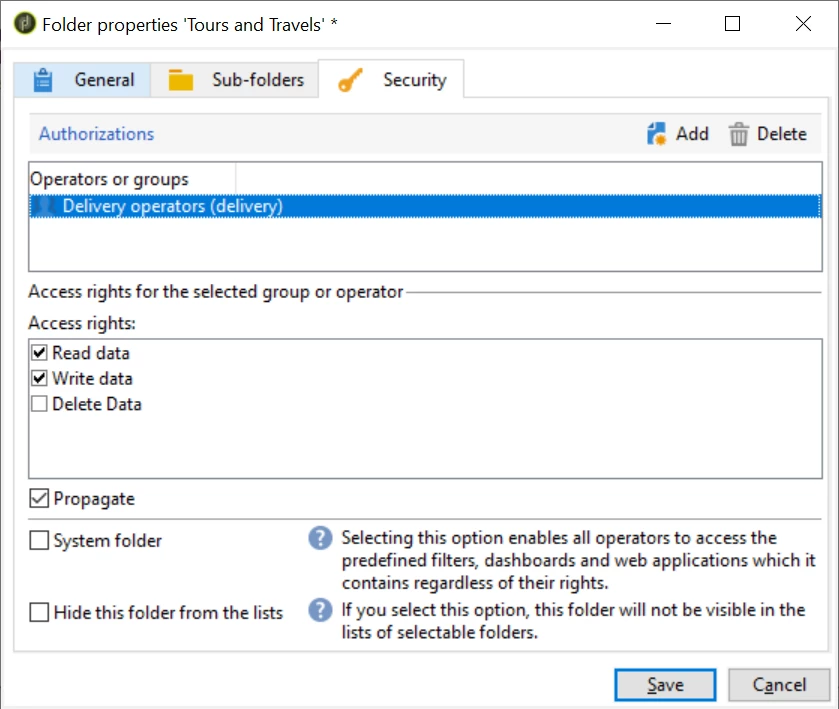
Then Open Folder Properties  --> Security --> Authorizations and provide 'Delivery Operator' access right to that folder.


Also, provide delivery operator right to your operator. Doing this will give access to your operator to this Delivery Folder.


Thanks.

1 reply

Jyoti_Yadav
Jyoti_YadavAccepted solution
Level 8
June 3, 2020

Hi,


You can grant access to selected set of deliveries by creating a storage folder for those deliveries.

Then Open Folder Properties  --> Security --> Authorizations and provide 'Delivery Operator' access right to that folder.


Also, provide delivery operator right to your operator. Doing this will give access to your operator to this Delivery Folder.


Thanks.

AnushkaRajan
Level 2
June 3, 2020
Hi Jyoti, After following the above mentioned steps, I am now able to view OOTB reports for the selected set of deliveries. However, I was also able to view data in the HOME Menu under Campaigns, Profiles and Targets, and Reports tab. To hide data on the Home Menu, I duplicated the "Delivery Operators" group and used the new group to provide access to the folder. Thank you for your help. It worked ! Regards, Anushka