Rendering problem with a use of a barcode in a delivery | Adobe Higher Education
Skip to main content
thibaultb473199
Level 4
January 15, 2020
해결됨

Rendering problem with a use of a barcode in a delivery

  • January 15, 2020
  • 1 답변
  • 2724 조회

I have an issue with the rendering of a barcode in my email.

This is what I use for my barcode right now in the email template :

<tr>
<td style="padding: 5px 0 15px;" align="center">
<img src="https://campaign.kruidvat.be/barcode/tISBN/h70/s2/v<%= targetData.cardNumber %>/barcode.gif" width="179" height="70" style="min-width: 179px; display: block; color: #6c1a2c; font-family: Helvetica, arial, sans-serif; font-size: 13px; width: 179px; " alt="barcode" border="0">
</td>
</tr>

And here is the rendering of the barcode when receiving the delivery :
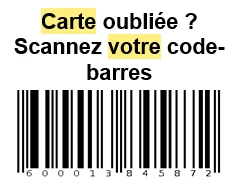
The numbers of the cardNumber are displaying correctly but the first number doesn't want to appear. (the first number should be on the far left of the barcode)

That means that only 12 numbers out of the 13 numbers are displayed correctly. For certain purpose, we can only use this type of barcode.

Is there something wrong in this part of the HTML or anywhere else ?

If you need more information about that, feel free to tell me.

Thank you for your help.

Kind regards.

이 주제는 답변이 닫혔습니다.
최고의 답변: Sukrity_Wadhwa

Hi @thibaultb473199,


The value assigned to a barcode depends on its type. For example, an EAN-8 type shall have exactly 8 numbers.The personalization button to the right of the Value field lets you add data in addition to the value itself. This enriches the barcode, provided that the barcode standard accepts it.

Kindly refer to the 'Inserting a barcode in an email' section in this documentation for steps and details regarding this: https://docs.adobe.com/help/en/campaign-classic/using/sending-messages/sending-emails/defining-the-email-content.html

Hope this helps.

Regards,

Sukrity

1 답변

Sukrity_Wadhwa
Community Manager
Community Manager
May 8, 2020

Hi @thibaultb473199,


The value assigned to a barcode depends on its type. For example, an EAN-8 type shall have exactly 8 numbers.The personalization button to the right of the Value field lets you add data in addition to the value itself. This enriches the barcode, provided that the barcode standard accepts it.

Kindly refer to the 'Inserting a barcode in an email' section in this documentation for steps and details regarding this: https://docs.adobe.com/help/en/campaign-classic/using/sending-messages/sending-emails/defining-the-email-content.html

Hope this helps.

Regards,

Sukrity

Sukrity Wadhwa