Remove duplicated rows based on other empty fields | Community
Skip to main content
Level 6
November 3, 2023
Solved

Remove duplicated rows based on other empty fields

  • November 3, 2023
  • 1 reply
  • 934 views

Hi, how do I remove duplicated rows from Recipient, where the key to identify the duplicated rows is the column "national_id" and we'd like to remove the rows where first_name and last_name are empty.

I think the deduplication activity only works on temporary results, and wouldn't remove the duplicated rows from Recipients, right?

Edit 1: 

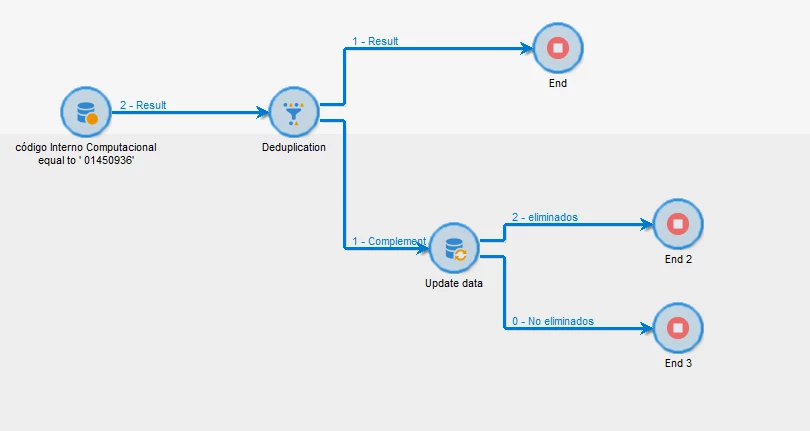
I tried to use a deduplication and then a delete activity, but , of course, the delete activity deleted both records with the same national_id, regardless if they had first and last name data. 
 

This post is no longer active and is closed to new replies. Need help? Start a new post to ask your question.
Best answer by ParthaSarathy

@god_prophet , if this is same question as previous post, You can apply the same solution here..

https://experienceleaguecommunities.adobe.com/t5/adobe-campaign-classic-questions/depuplication-based-on-other-empty-fields/td-p/631216

1 reply

ParthaSarathy
Community Advisor
ParthaSarathyCommunity AdvisorAccepted solution
Community Advisor
November 3, 2023
~  ParthaSarathy S~  Click here to join ADOBE CAMPAIGN USER GROUP for Quarterly In-person | Hybrid | Virtual Meetups
Level 6
November 3, 2023

 @parthasarathy 

Not sure if is the same since the Deduplication activity only separates but don't remove the duplicated Recipients from Recipients table. 

Please, see edit 1 in this new question.

ParthaSarathy
Community Advisor
Community Advisor
November 3, 2023

@god_prophet , share the screenshot of Update data (delete) activity configuration, to see your reconciliation configuration.

And what is the primary key in your targeting dimension schema?

~  ParthaSarathy S~  Click here to join ADOBE CAMPAIGN USER GROUP for Quarterly In-person | Hybrid | Virtual Meetups