This post is no longer active and is closed to new replies. Need help? Start a new post to ask your question.
ParthaSarathy
ParthaSarathyAccepted solution
Community Advisor
Nov 16, 2022 1:40 PM UTC

Hi @srinivas1254 ,

You can try the below approach,


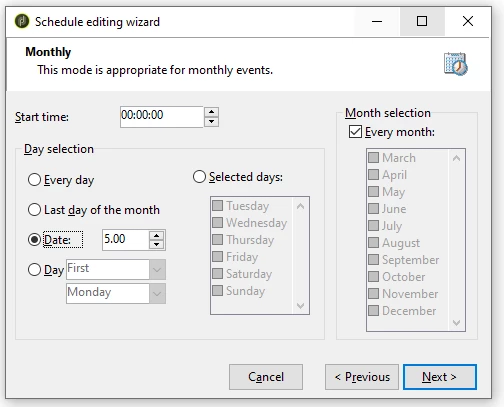
Scheduler:

Scheduler > Advance tab > Initialization script:

vars.day = formatDate(new Date(), "%2A");

Test Activity:

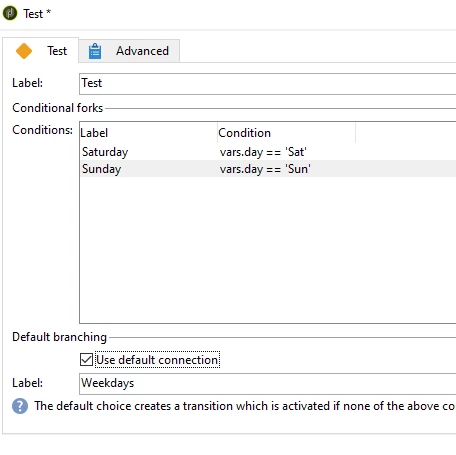
Create 2 conditions,

//Condition1: (Label: Saturday)
vars.day == 'Sat'

//Condition2: (Label: Sunday)
vars.day == 'Sun'

//Default connection Label as 'Weekdays'


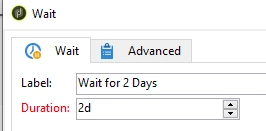
Wait Activity:

Define duration of 2d for Saturday and 1d for Sunday

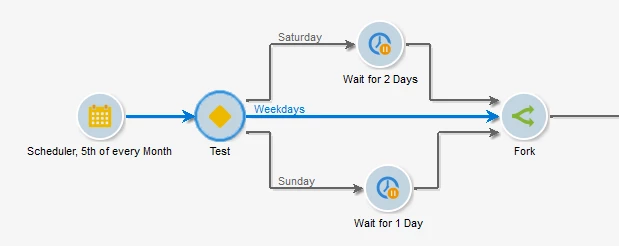
So If 5th of the Month is Saturday, It will wait for 2 days and trigger the remaining flow on Monday, and same for Sunday (get triggered after 24hrs).

And if 5th of the month falls on rest of the weekdays (Mon-Fri), Workflow will trigger on the same day.


~  ParthaSarathy S~  Click here to join ADOBE CAMPAIGN USER GROUP for Quarterly In-person | Hybrid | Virtual Meetups

2 replies

ParthaSarathy
Community Advisor
ParthaSarathyCommunity AdvisorAccepted solution
Community Advisor
Nov 16, 2022 1:40 PM UTC

Hi @srinivas1254 ,

You can try the below approach,


Scheduler:

Scheduler > Advance tab > Initialization script:

vars.day = formatDate(new Date(), "%2A");

Test Activity:

Create 2 conditions,

//Condition1: (Label: Saturday)
vars.day == 'Sat'

//Condition2: (Label: Sunday)
vars.day == 'Sun'

//Default connection Label as 'Weekdays'


Wait Activity:

Define duration of 2d for Saturday and 1d for Sunday

So If 5th of the Month is Saturday, It will wait for 2 days and trigger the remaining flow on Monday, and same for Sunday (get triggered after 24hrs).

And if 5th of the month falls on rest of the weekdays (Mon-Fri), Workflow will trigger on the same day.


Translate
~  ParthaSarathy S~  Click here to join ADOBE CAMPAIGN USER GROUP for Quarterly In-person | Hybrid | Virtual Meetups
CedricRey
Level 5
Nov 17, 2022 2:41 PM UTC

Hi @srinivas1254 

The @parthasarathy solution is smart, explanations are very complete, I suggest you to use it.

In another hand, I made an other solution, but more technical and less understandable. Just to have a link somewhere I put it here (it's a package) :

Adobe-Campaign-Tools/ScheduleWeekConstraint.xml at main · cedricrey/Adobe-Campaign-Tools (github.com)

Translate