Recurring deliveries error because of contact date | Adobe Higher Education
Skip to main content
Level 2
April 2, 2022
Domanda

Recurring deliveries error because of contact date

  • April 2, 2022
  • 2 risposte
  • 1923 visualizzazioni

Hello everyone,


We have errors with our recurring deliveries after we set up a contact date to apply the pressure rules,

We chose option 3 of the native scheduler of the deliveries but we get errors and we are obliged to restart the workflows after every error.

This is how we set up our contact date,
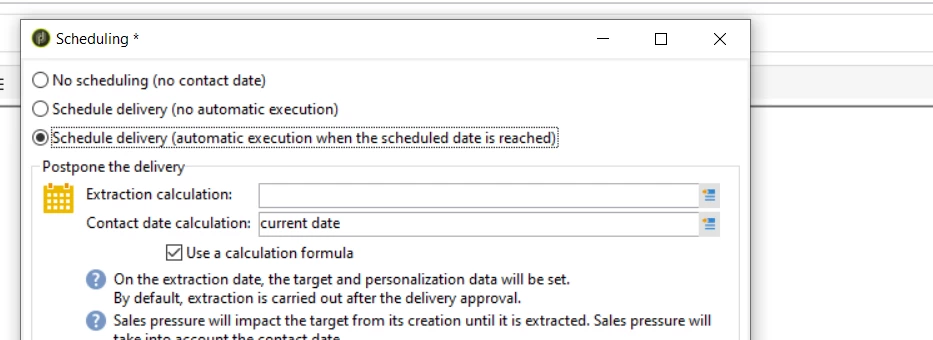
We tried multiple functions such as current date + 2h, current date +1d... but we still get the errors below.

Please note that When the first option of the scheduler (No scheduling) is chosen everything works fine and that the volume of the target is low (from 4 to 3000 emails each day) and that the "tablespace undo" has already been modified to 300Mb and everything seems ok database-wise.


Do you have any idea how we can work this out, please?


Thanks


Questo argomento è stato chiuso alle risposte.

2 risposte

Level 6
April 4, 2022

Hi @ofattah ,

You need to mention both "Extraction Calculation" and "Contact Date Calculation". It is better to keep a gap between them as the extraction may take some time in case of deliveries with big volume. And the Contact date is when it is actually sends the comms.

You can try the following(just an example). Also, if you have pressure rules in place you need to keep an eye on the timings.


Extraction Calculation: current date + 5 minutes

Contact Date Calculation: current date + 10 minutes


Thanks,

Deb

OfattahAutore
Level 2
April 4, 2022

Hi @debtr 


Thank you for your response.


We already tried putting a gap between "Extraction Calculation" and "Contact Date Calculation" of even one day but we still had the error.


The error is caused by the pressure rules we have, if we disable the pressure rules and keep the  "Extraction Calculation" and "Contact Date Calculation" everything works well but as soon as we activate the pressure rules these errors occur.

Could you please explain what do you mean by "if you have pressure rules in place you need to keep an eye on the timings"?


Thank you

Level 6
April 4, 2022

Hi @ofattah ,

Great that you know the pressure rule is causing the issue.

Are you aware of what is there in the pressure rule and what may cause this? Resolving this may help you find the solution.

Also, It would be great look at the "Audit" tab of the delivery for more details for errors or details of delivery analysis.


What I meant by keeping an eye on the timings was the following,

"For the pressure rule exclusions to be implemented successfully, make sure you set the extraction date and time before the contact date and time, as well as before the nightly arbitration is re-applied. For more on this, refer to Exclusion after arbitration."


https://experienceleague.adobe.com/docs/campaign-classic/using/orchestrating-campaigns/campaign-optimization/pressure-rules.html?lang=en


Thanks,

Deb

Sukrity_Wadhwa
Community Manager
Community Manager
May 18, 2022

Hi @ofattah,

Were you able to resolve this query or do you still need more help here? Do let us know.

Thanks!

Sukrity Wadhwa