Questions in a web form | Community
Skip to main content
July 5, 2018
Solved

Questions in a web form

  • July 5, 2018
  • 1 reply
  • 1637 views

Hi Guys,

I would like to create a web form to unsubscribe customers

Into this web form, I would like to create a bloc to know why people are unsubscribing from my company

It would be a bloc with choices like this : Explain the raisons of your unsubscribe

Choice 1 Choice 2 etc

Is it possible to create this in a web form in Adobe campaign and where the data are stocked ?

Thanks

This post is no longer active and is closed to new replies. Need help? Start a new post to ask your question.
Best answer by anshshar_cfs

Hi Gabriel

If I understand correctly, you are looking for an option like shown in below screenshot :
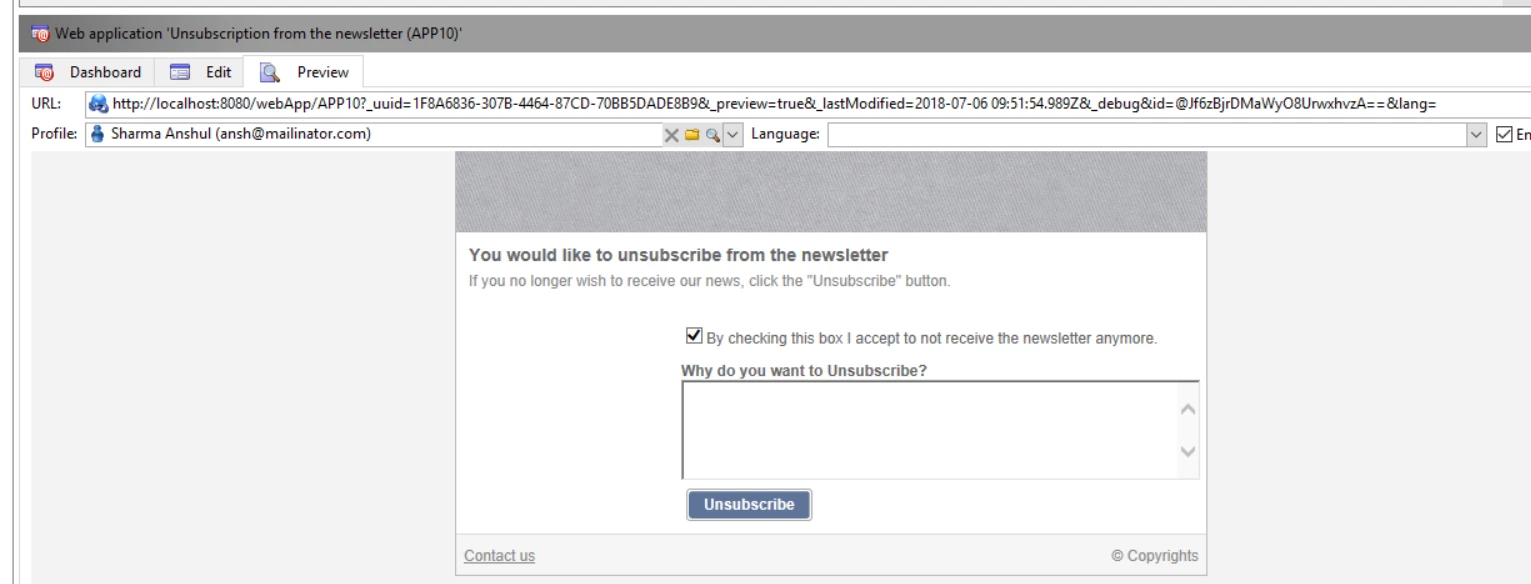
In order to achieve this, you will need to create new web application using default unsubscription form and then customize the web application to include either a text area or check box to grab the reasons and assign a field where you want the data to be saved.

In above example assigned a comment filed to this textarea check below :


In addition to this, you may want to go through below article to understand how you can manage subscriptions and un-subscription :

https://docs.campaign.adobe.com/doc/AC/en/DLV_Subscriptions_and_referrals_Managing_subscriptions.html

In case you want to create you own custom web form , you may follow the article : https://docs.campaign.adobe.com/doc/AC/en/WEB_Web_forms_About_web_forms.html . This would guide you to create a new web-form from scratch.

Let me know if this approach helps.

Regards

Anshul Sharma.

1 reply

anshshar_cfsAdobe EmployeeAccepted solution
Adobe Employee
July 6, 2018

Hi Gabriel

If I understand correctly, you are looking for an option like shown in below screenshot :

In order to achieve this, you will need to create new web application using default unsubscription form and then customize the web application to include either a text area or check box to grab the reasons and assign a field where you want the data to be saved.

In above example assigned a comment filed to this textarea check below :


In addition to this, you may want to go through below article to understand how you can manage subscriptions and un-subscription :

https://docs.campaign.adobe.com/doc/AC/en/DLV_Subscriptions_and_referrals_Managing_subscriptions.html

In case you want to create you own custom web form , you may follow the article : https://docs.campaign.adobe.com/doc/AC/en/WEB_Web_forms_About_web_forms.html . This would guide you to create a new web-form from scratch.

Let me know if this approach helps.

Regards

Anshul Sharma.