Level 2
Oct 23, 2023 10:45 AM UTC
Solved

QUERY TRANSACTIONAL MESSAGE

Hi,

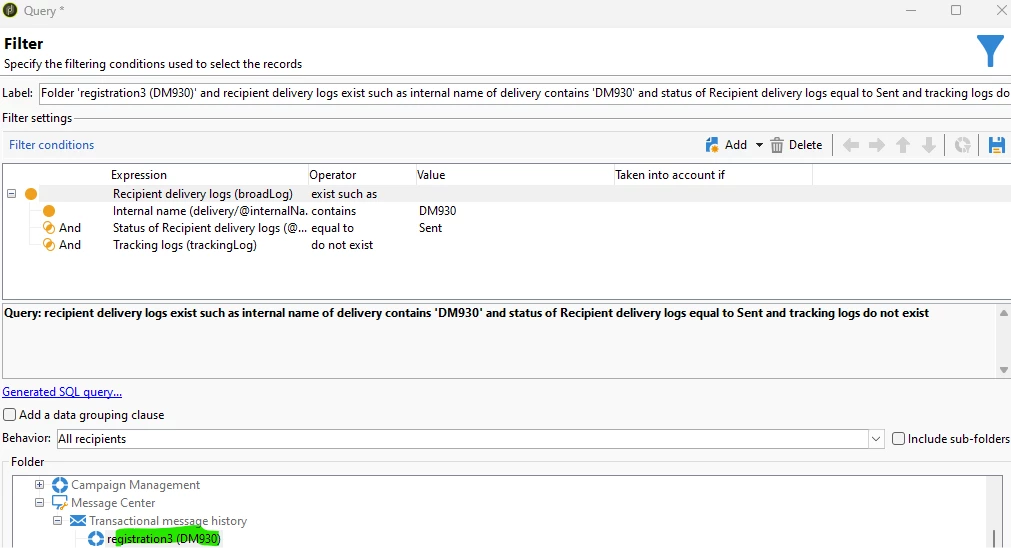
I want to create a query with the following conditions: all users who have received the transactional message "registration3" but did not open it.

I have created this one you can see below but it always comes to zero results and I do not knowwhy as I look into the delivery and it has interactions... 😞

Can someone help me to find the mistake? Thanks in advance 🙂
 

Kind regards,

B

 

This post is no longer active and is closed to new replies. Need help? Start a new post to ask your question.
ParthaSarathy
ParthaSarathyAccepted solution
Community Advisor
Oct 23, 2023 11:57 AM UTC

Hi @bcollado1 ,

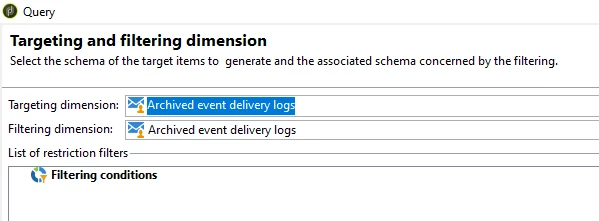
In Query, Select Targeting dimension and Filtering dimension as nms:broadLogEventHisto


Filtering Condition:

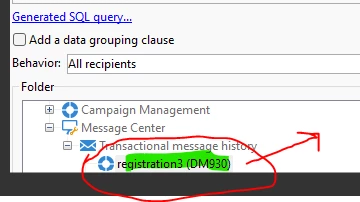
Right click the Folder > Properties > Copy the internalName.

Consider the internal name is DM930


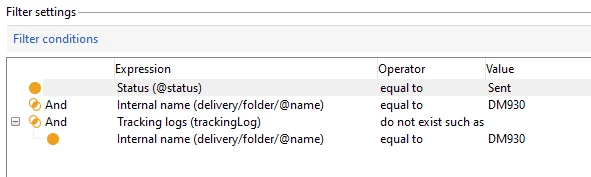
@status equal to sent

AND

[delivery/folder/@name] equal to DM930

AND
trackingLog Do not exist such as

[delivery/folder/@name] equal to DM930

~  ParthaSarathy S

5 replies

ParthaSarathy
Community Advisor
ParthaSarathyCommunity AdvisorAccepted solution
Community Advisor
Oct 23, 2023 11:57 AM UTC

Hi @bcollado1 ,

In Query, Select Targeting dimension and Filtering dimension as nms:broadLogEventHisto


Filtering Condition:

Right click the Folder > Properties > Copy the internalName.

Consider the internal name is DM930


@status equal to sent

AND

[delivery/folder/@name] equal to DM930

AND
trackingLog Do not exist such as

[delivery/folder/@name] equal to DM930

Translate
~  ParthaSarathy S
bcollado1Author
Level 2
Oct 24, 2023 7:13 AM UTC

Hi,


thank you very much for your help 🙂


One last question about it, if I want to leave this workflow executing everyday, I want to add to the query the following: users created one day ago as I want to send them an email 24h after their creation.


Is this way ok?


Thank you very much as always 🙂


Kind regards,

B


Translate
bcollado1Author
Level 2
Oct 24, 2023 8:32 AM UTC

or maybe could it be like this?


Translate