Query segmenting users that have not clicked on email URL | Community
Skip to main content
Frankie_d
Level 2
May 8, 2023
Solved

Query segmenting users that have not clicked on email URL

  • May 8, 2023
  • 2 replies
  • 765 views

Hi Team, 


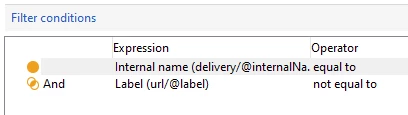
I am trying to build a simple query to identify anyone who has not clicked on a specific URL in an email. I'm using the Recipient tracking log as the filtering dimension and I've created a filter using 'Internal name (delivery@internalName)' And 'URL label (URL/@label)' , however the result of the query still shows records that have have clicked on the URL. Are there additional filters that may need to be applied to segment this query or is the filtering dimension being used incorrect? 
 

Thanks

Frankie 

This post is no longer active and is closed to new replies. Need help? Start a new post to ask your question.
Best answer by SatheeskannaK

Keep what you have targeting dimension as Recipients and filtering dimension as Tracking logs. Try to use the field (url/@type) and source URL to get the appropriate recipient tracking for the specific URL.


2 replies

SatheeskannaK
Community Advisor
SatheeskannaKCommunity AdvisorAccepted solution
Community Advisor
May 8, 2023

Keep what you have targeting dimension as Recipients and filtering dimension as Tracking logs. Try to use the field (url/@type) and source URL to get the appropriate recipient tracking for the specific URL.


Thanks, Sathees
ParthaSarathy
Community Advisor
Community Advisor
May 8, 2023

Hi @frankie_d ,

For all actions performed by a Recipient on the delivery (like email open, click on link1, link2, link3 etc) a respective records will get created in tracking log schema.

So If a recipient had opened an email and clicked on 2 links, 3 records will get created in tracking log schema. In this case, If you do a query as recipient who had not clicked on link2, but still he had record on link1, the recipient will come as output.

Solution:

Query1:

Targeting Dimension: Recipient

Filtering Dimension: Recipient tracking log

Fetch all the recipient who had tracking log records on the particular delivery.


Query 2:

Targeting Dimension: Recipient

Filtering Dimension: Recipient tracking log

Fetch all the recipient who had clicked on the particular URL (which you dont want to be targeted as part of your requirement).


Exclusion:

Set Query 1 as primary set


As result, Recipients who has not clicked on a specific URL (URL mentioned in Query2) will be targeted.

~  ParthaSarathy S~  Click here to join ADOBE CAMPAIGN USER GROUP for Quarterly In-person | Hybrid | Virtual Meetups