Push Notification Adobe Campaign Classic | Community
Skip to main content
November 18, 2022
Solved

Push Notification Adobe Campaign Classic

  • November 18, 2022
  • 1 reply
  • 1937 views

Hi Team,


Currently we are working on Push Notification Integration with the Mobile App team ,


1. we have completed setting up external account and iOS and Android based on (Configure the Android mobile application in Adobe Campaign | Adobe Campaign) documentation

2. Created iOs and Android service with the help of certificate base authentication (p12 for iOs and Httpv1 along with firebase private key and client email) we are getting the connection test successful alert as well.

3. Created a mobile app property along with the integration keys based on Installing the mobile app channel | Adobe Campaign this documentation. 


Since the Mobile App is being developed in React Native Platform not sure how do we share the Adobe Campaign Classic SDK's to the mobile team. 


Could someone please help us on the next steps? Thanks in Advance 


Thanks,

Shine v.v
This post is no longer active and is closed to new replies. Need help? Start a new post to ask your question.
Best answer by Shubham_Goyal__

Hi @shinev_ ,


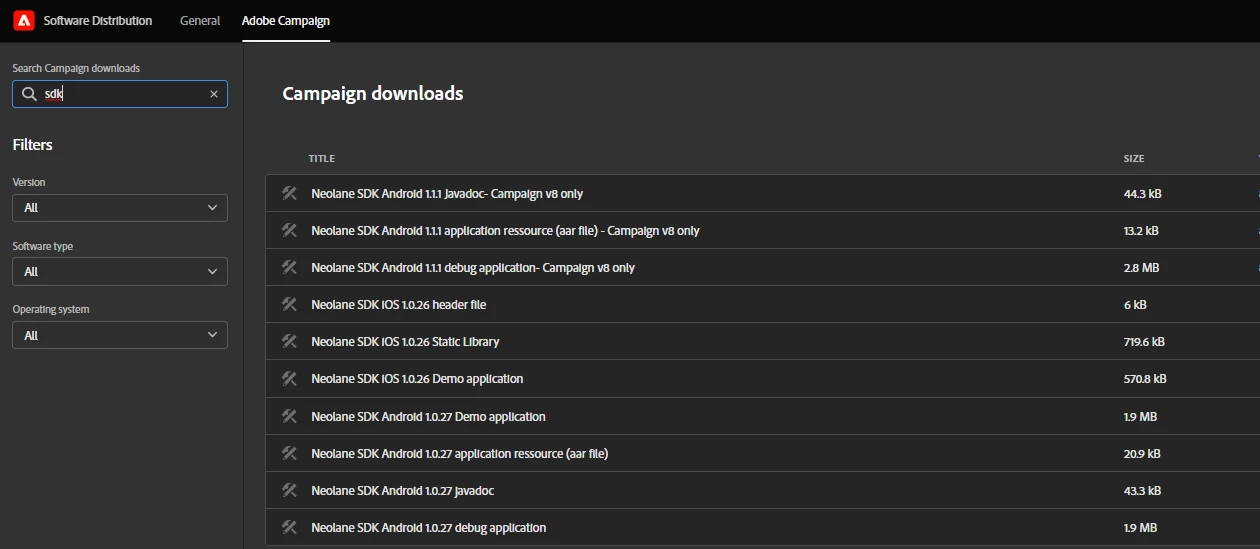
If your question is as to how to get the Adobe campaign mobile SDK then you may get the same from the 'Software Distribution' tool of Adobe experience cloud. Here is how


Br,

Shubham

1 reply

Shubham_Goyal__
Shubham_Goyal__Accepted solution
November 22, 2022

Hi @shinev_ ,


If your question is as to how to get the Adobe campaign mobile SDK then you may get the same from the 'Software Distribution' tool of Adobe experience cloud. Here is how


Br,

Shubham

ShineV_Author
November 24, 2022

Hi @shubham_goyal__ ,


Thank you for your reply, realy appretiate it, could you please lt me know if all the steps that i have mentioned above is correct or if we are missing anyting for push notification configuration in Adobe Campaign Classic.


Thanks,

Shine v.v

Shubham_Goyal__
November 24, 2022

Hi @shinev_,


Yes, your approach seems to be right.


These are the steps for a mobile app channel setup:

1. Install the mobile app channel by importing the 'Push channel' package in your campaign Instance.

2. Set up the Push channel external account.

3. Create/configure the Mobile App service in the Adobe campaign.

4. Create and Configure the Push Channel property using the AEP Mobile SDK in Launch.

5. Once the property is created in Launch then install that SDK library in your mobile app


Best tutorial videos on this setup can be found here


Br,
Shubham