
Primary key is not incremented correctly in the custom schema | Community
Skip to main content
Sathyam999
November 7, 2023
Solved

Primary key is not incremented correctly in the custom schema

  • November 7, 2023
  • 2 replies
  • 1153 views

Dear Community's Leaders,


I have created custom schema but auto primary key is not incremented correctly.

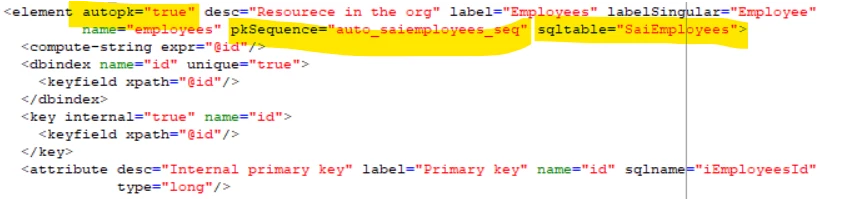
schema structure: I have used auto pk true
 

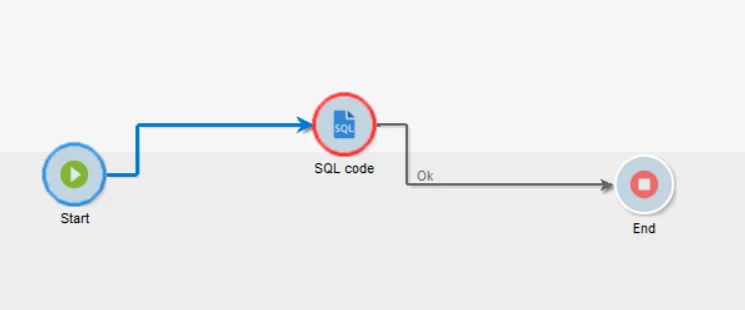
I tried community suggestion to solve this issue through workflow using SQL code activity, still I am getting error. 


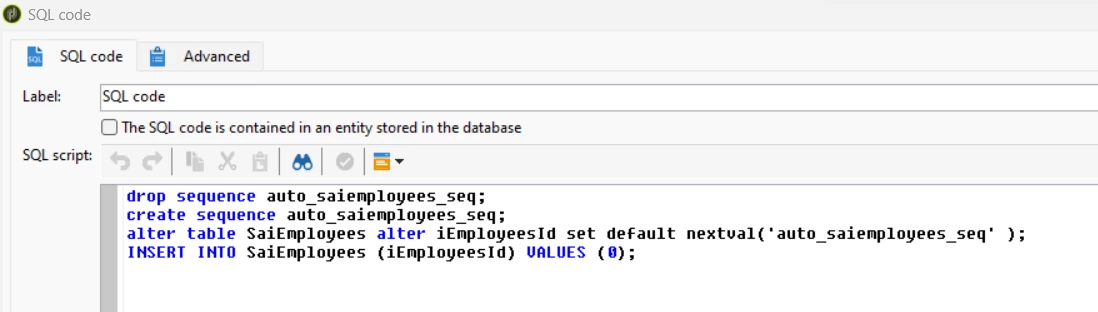
SQL:


Can you please help me this.



This post is no longer active and is closed to new replies. Need help? Start a new post to ask your question.
Best answer by Manoj_Kumar

Hello @sathyam999 


You have shared 2 screenshots form 2 different instances.


I assume the one attached in the main thread is from production env. You are using the custom sequence where it should work. Try, removing the Key and deindex attributes. The keys are also indexed and since you are using autopk, you don't have to define the primary key.

2 replies

AkshayAnand
Community Advisor
Community Advisor
November 7, 2023

Hi @sathyam999 


As using the SQL script you have already assigned the first key with 0 value, hence while using insert or update activity you are getting this duplicate error. Could you try insert a record manually either by SQL script or Javascript, and then try to insert using the activity.


Regards

Akshay

Sathyam999
November 7, 2023

Hi @akshayanand ,

Thank you for your response,


when I enter the values into the schema through SQL code, data inserted correctly into the data base but primary key is not incremented properly, when I enter data manually in the form.

It is incremented randomly not sequentially like 1,30,60,90..


when I enter the data into the schema, it should be updated 1,2,3 like this, can you please tell if there is any other solution.

I have used autopk="true" in the schema


Regards

Sathyam

LakshmiPravallika
Community Advisor
Community Advisor
November 8, 2023

Hi @sathyam999 ,


The solution for the Incrementing gap for autopk is given in the below thread , where David had explained why there would be a gap of 30 for each Increment. Please refer to the below thread, you can replace the function used to generate the Sequence. Although there can be a risk during the bulk Inserts/Updates if there is an Increment of 1, as all the sequences should be assigned to bulk data at once.


https://experienceleaguecommunities.adobe.com/t5/adobe-campaign-classic-questions/autopk-in-the-schema-is-not-incrementing-properly-when-used/m-p/611211#M19137


Regards,

Pravallika.


Manoj_Kumar
Community Advisor
Manoj_KumarCommunity AdvisorAccepted solution
Community Advisor
November 7, 2023

Hello @sathyam999 


You have shared 2 screenshots form 2 different instances.


I assume the one attached in the main thread is from production env. You are using the custom sequence where it should work. Try, removing the Key and deindex attributes. The keys are also indexed and since you are using autopk, you don't have to define the primary key.

Manoj  | https://themartech.pro
